Minor improvements
A small refinement from this release:
- The Next scheduled date above your campaigns list now links straight to that campaign, with a tooltip, so you can open it in one click.

The latest improvements to Boom.
A small refinement from this release:
After you upload a CSV to a campaign, the variable picker in your template now offers your CSV columns directly, so each message is filled with the right value for each person. Boom also warns you before sending if a variable would go out blank.
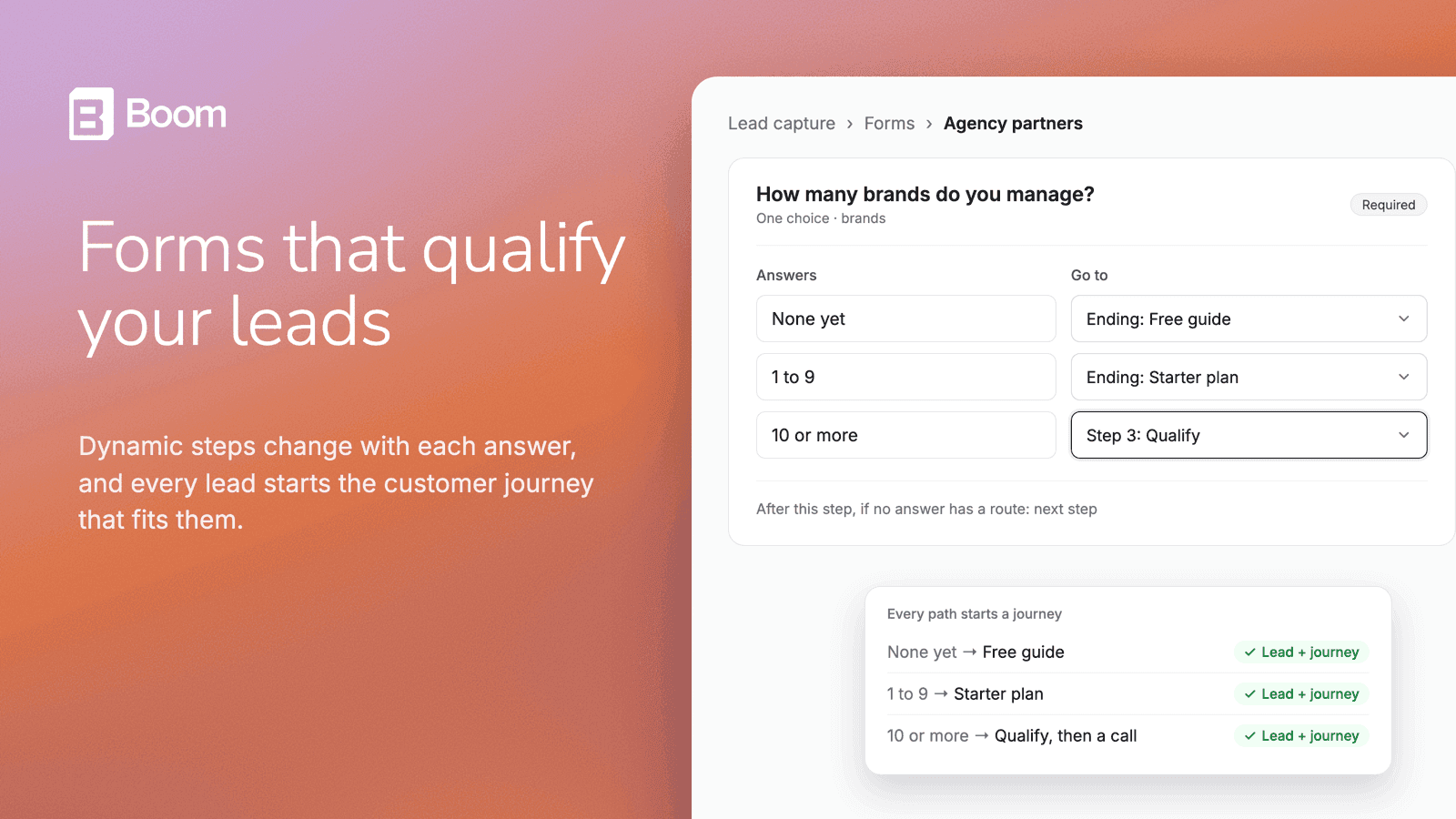
Embedded forms now have dynamic steps. In Lead capture › Forms, each answer to a choice question gets a Go to (a later step or an ending), and number or scale questions take ranges, such as 1 to 9 or 10 or more. Your best leads reach the booking link, and everyone else gets the guide, the plan or the page that fits them.
Every path still asks for an email or phone before it ends, so each visitor is saved as a lead and can start their own customer journey. Boom checks this when you publish. See how it works.
You can now connect a MySQL database as a source, the same way you connect Postgres. Boom reads your tables on a schedule, keeps people, objects and relationships up to date, and lets you use that data in segments, journeys and campaigns without exporting anything.
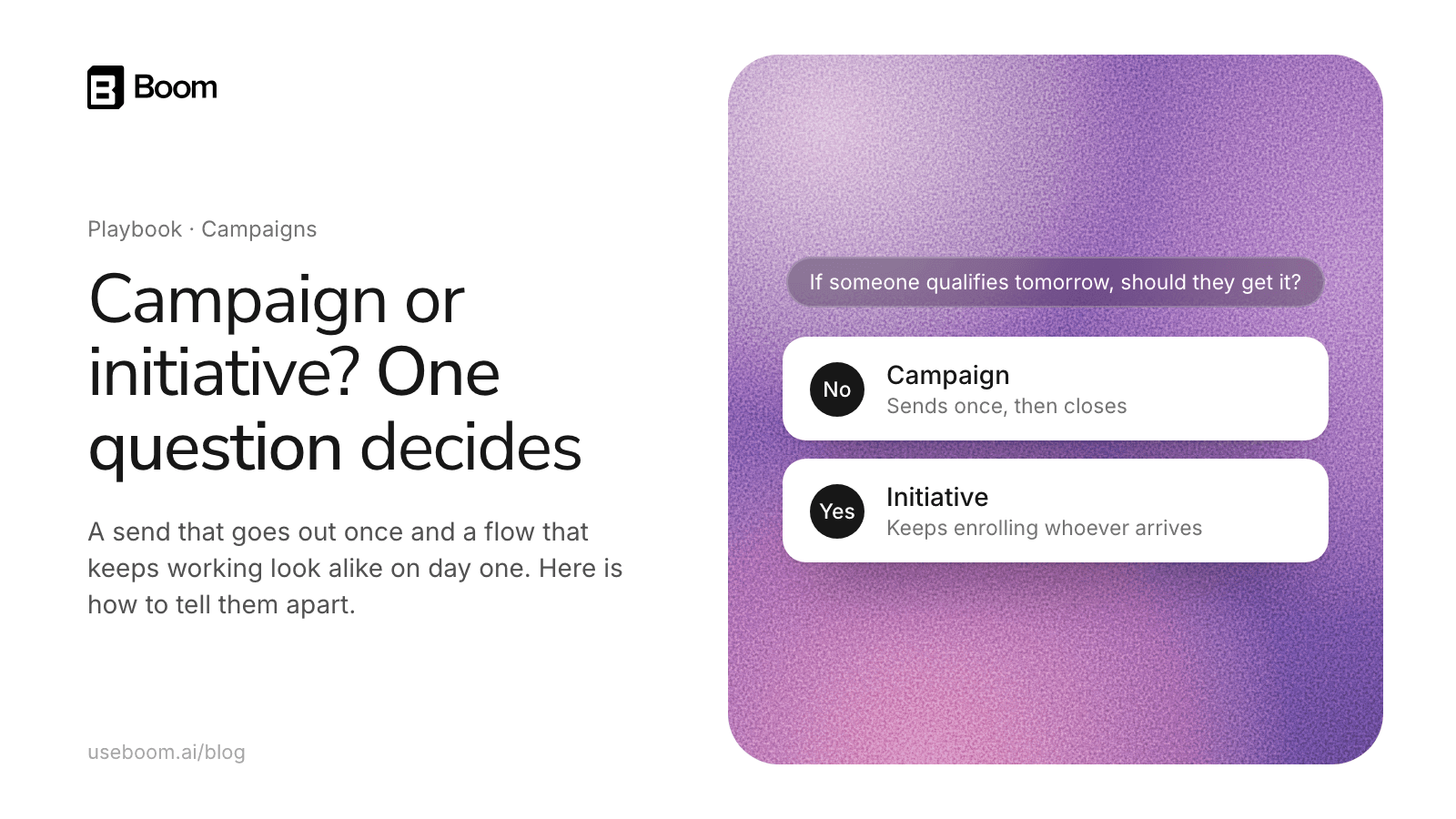
New campaign now opens a single screen in every workspace. Target a segment, read at send time so someone who buys before then drops out on their own, or add people by hand or from a CSV. Add your email and WhatsApp templates, preview them as any person, and schedule the send for now or any date and time. Each person gets it once, and the campaign closes with its report when the last conversation ends.
Smart Sending skips people inside your limits unless you turn on Always send, and Review before sending holds every message in Drafts until someone on your team approves it. Choosing between a campaign and an initiative? One question tells you.
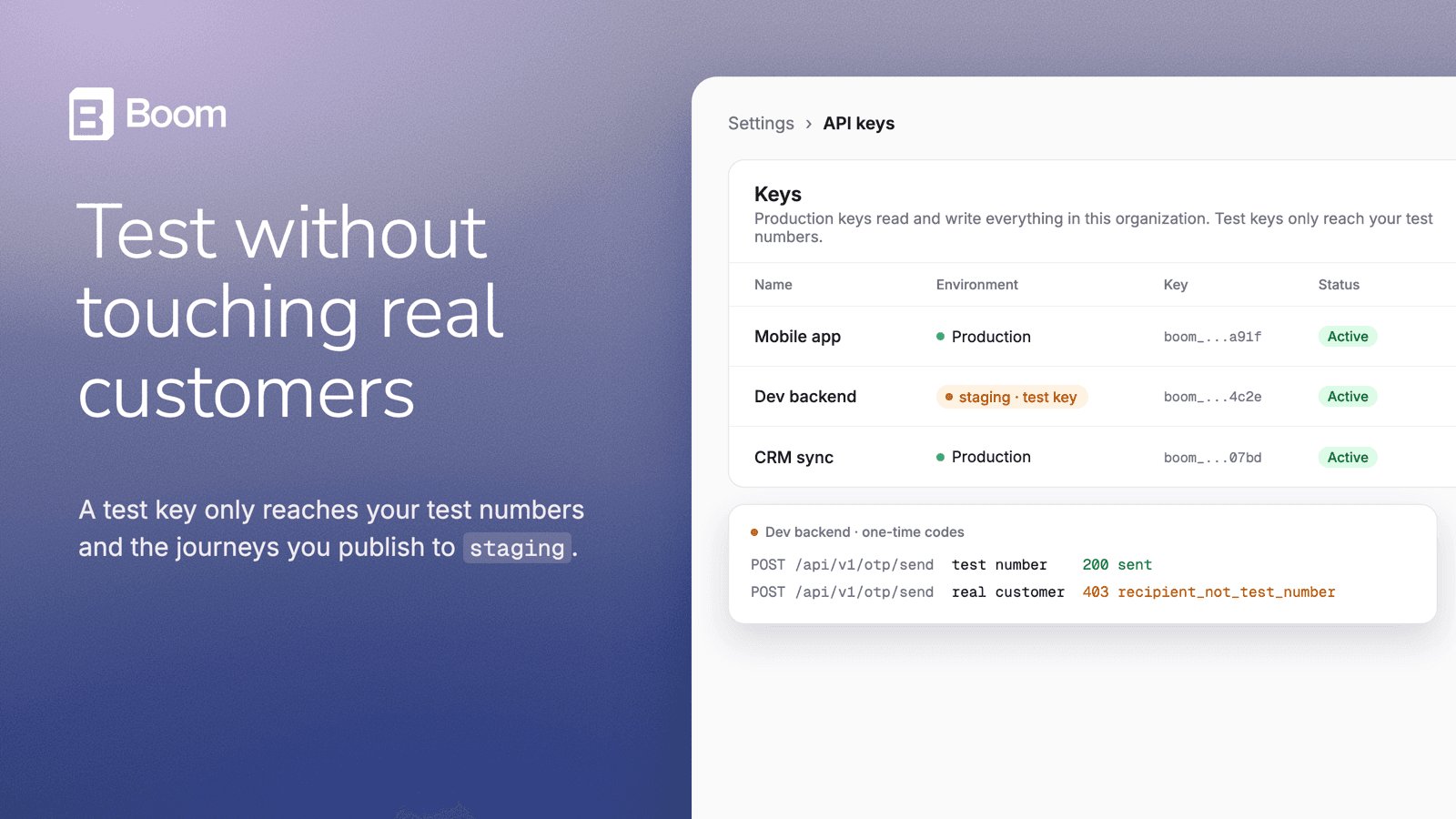
You can now create a test key in Settings › API keys by choosing a non-production environment, such as staging. It works like a production key from your development backend, but it only messages your test numbers, only starts journeys published to that environment, and never touches a production run.
A test key can send and verify one-time codes, upsert test people and record events. Every other endpoint answers 403 environment_not_supported. Your production keys work exactly as before. See how it works.
The new Email unsubscribes view under People shows everyone who opted out of your marketing email, so brand admins can read the list, search it and export it to CSV. You can resubscribe someone right there, with a required reason that stays on record, which also helps you answer data access requests.
A few smaller refinements from this release:
A few smaller refinements from this release:
A batch of smaller customer-facing improvements shipped today:
The Plan and usage page in Settings is clearer. Your credits card now leads with the net balance, flags when you are in debt, and shows your next renewal, the credits it will add, and what you have used this cycle. The wallet card puts Add funds right where you need it. On eligible plans you can also buy credit packs from the buy-credits page, with the savings on larger packs shown up front.
A few smaller refinements from this release:
The inbox now has a Recent activity panel that shows the Instagram and Facebook post comments from the customer you are viewing, newest first. Each comment shows where it came from and when, and flags whether a private reply already went out, so you have the full context of what someone said in public before you answer.
When a journey starts from a comment on your Instagram or Facebook posts, a Decision can now branch on the text of that comment, so you route people by what they actually wrote. The inbound trigger is now called Incoming activity to make clear it enrolls both messages and comments.
In a run's detail, each completed send now lets you open the exact message that went to the customer, whether it was sent over WhatsApp, SMS, Instagram, Messenger or email. Before, the timeline only named the template, so now you can confirm what was actually delivered without leaving the page.
You can now connect a Snowflake warehouse to Boom and sync its tables into your customer data, alongside the Postgres and MySQL connections already supported. The connection signs in with a key pair, so it works with service accounts, and once it is set up Boom keeps the data flowing on its own.
A few smaller refinements from this release:
When a journey still has people waiting to be enrolled, you can now Start all pending from the Executions page and Boom enrolls every one of them in the background, with a progress banner so you can keep working while it runs. Before, you could only start the contacts you had selected on the page.
A few smaller refinements from this release:
The list behind Campaigns, Initiatives and Transactional can now be sorted and filtered. Sort by name, created date or last updated from the column headers, and the order is remembered per surface in your browser.
A quick status switch (All, In progress, Drafts, Finished) sits above the list, and a new Created by filter narrows it to the person who made each item. Channel badges are gone from the rows to keep them clean.
You can now edit a WhatsApp number's business profile without leaving Boom: display name, photo, about, description, category, email, address and up to two websites. Before, changing a name or photo meant going through Twilio Support or Meta's WhatsApp Manager.
Because Meta reviews display names, each number shows where its name stands: in review, updated, declined (with a link to the guidelines) or needing a retry. The new number page splits everything into WhatsApp profile, In Boom and Calling tabs, so the profile your customers see lives in one place.
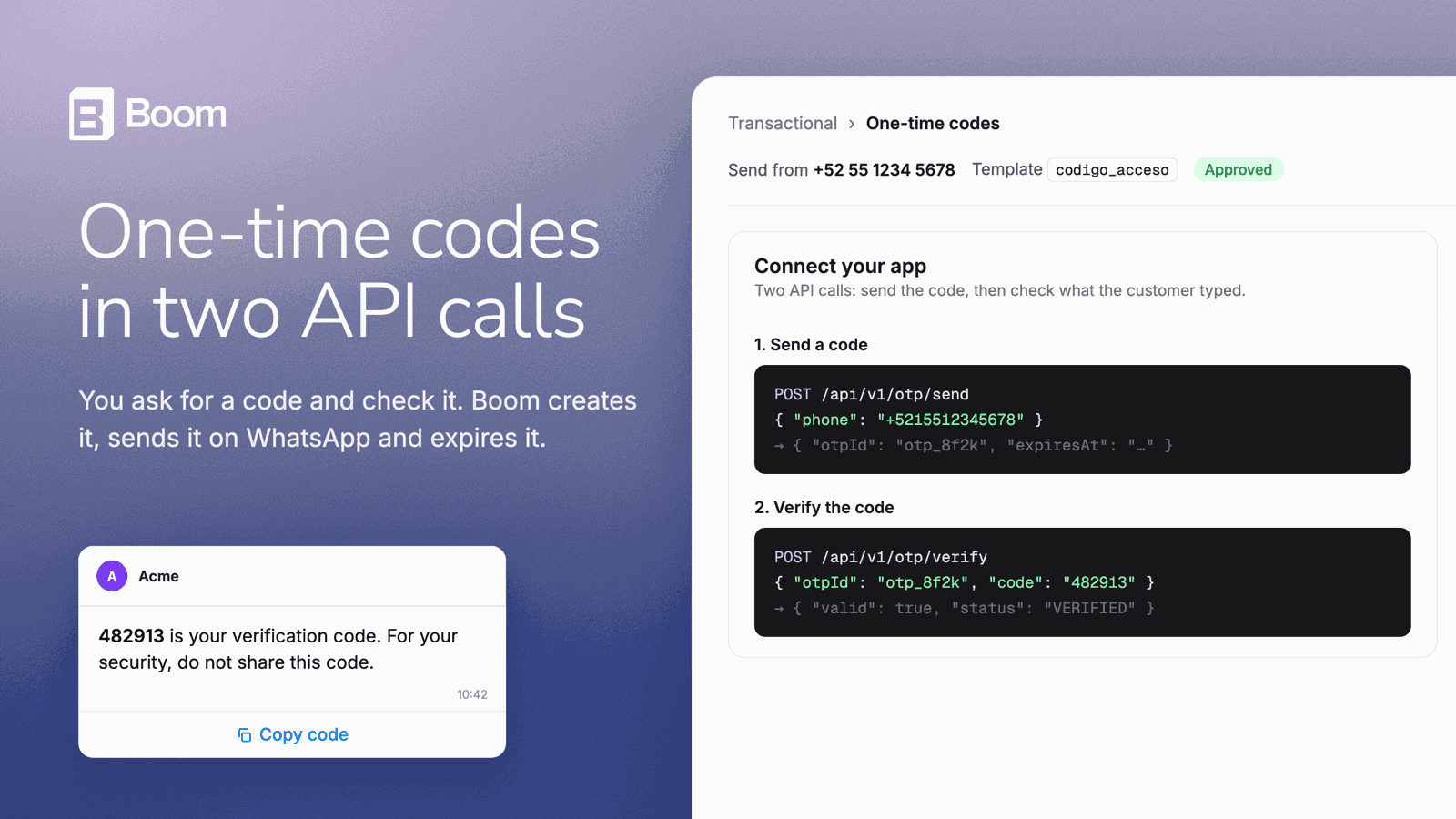
You can now send login and verification codes on WhatsApp with two API calls: POST /api/v1/otp/send to ask for a code and POST /api/v1/otp/verify to check what your customer typed. Boom creates the code, sends it with a Copy code button, resends the same code while it's valid, expires it and locks it after too many wrong guesses.
Set it up in Transactional › One-time codes: pick the WhatsApp number, choose or create the code template and send yourself a test code. It's available in every workspace. See how it works.
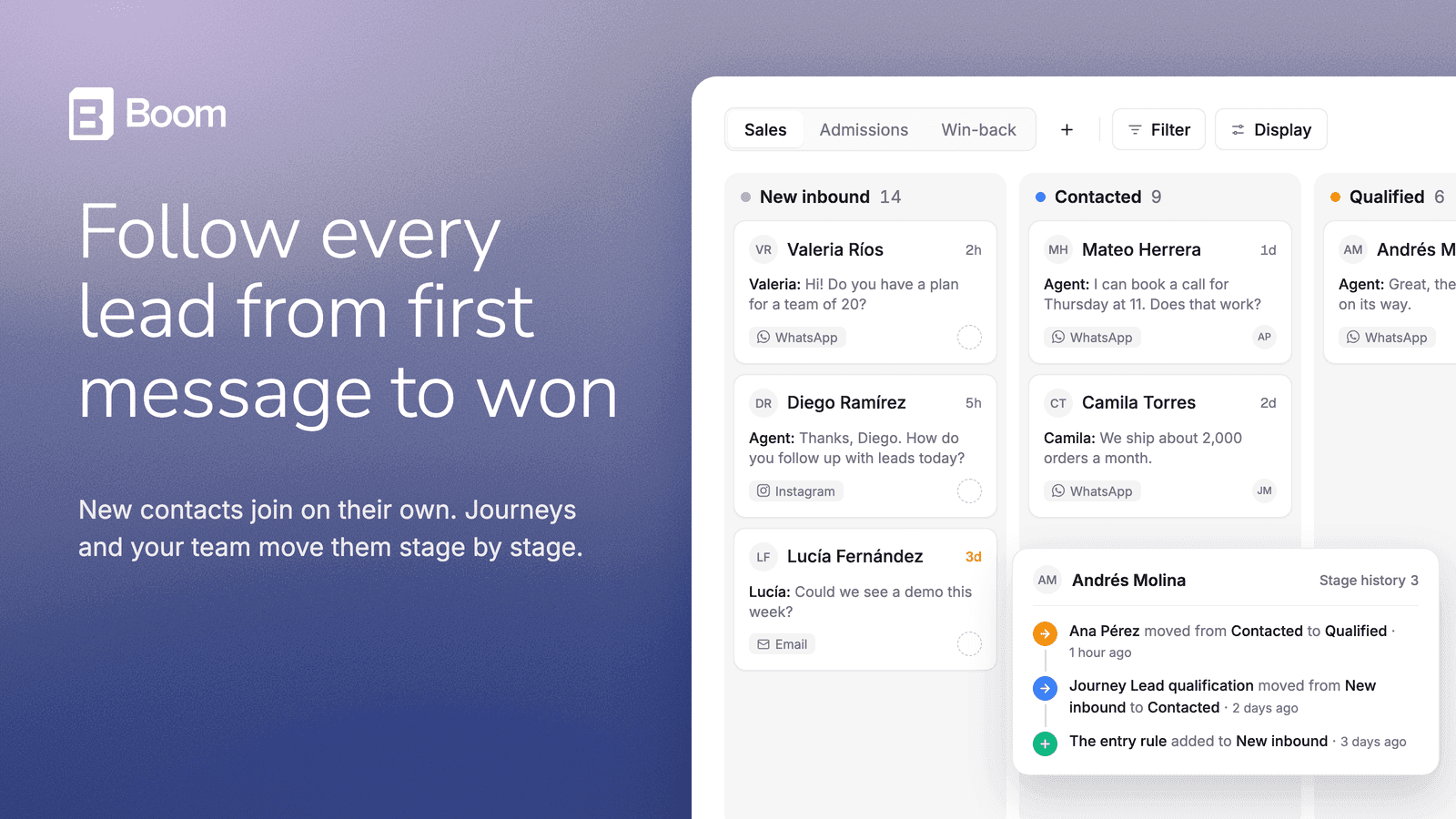
Pipelines puts the people you talk to on a board of stages. Each card shows the person's last message, channels, owner and time in stage, and opens their conversation and Stage history. Start from the Sales, Admissions or Win-back template, or a blank one.
People join by hand, through an entry rule (everyone who enters a segment) or from a journey's Move to stage step, and every stage change is an event your journeys and segments can use. Pipelines is in every workspace: open it in the sidebar. See how it works.
A few smaller improvements from the last day:
Email conversations in the shared inbox now open in a proper email reading view, even if your workspace only sends email and has no mailbox connected. Emails you sent show at full size in the reading pane, grouped by subject.
If replying by email is off, the reply box no longer sits there doing nothing: it says so and offers a Turn on email button that takes you to Settings › Email. That page is also reorganized into two clear sections, Send email (domain and senders) and Reply to customers from Boom.
The Help Center is now on for every workspace. Write articles in English, Spanish and Portuguese from the dashboard and publish them on a help site branded as yours, at your Boom address (<your-slug>.useboom.help).
To take a help center live, your workspace needs to be activated. Admins can control who manages it from Settings › Roles, where Help centers now has its own row.
Your lead-capture pop-up now has a funnel. See how many times it was shown, how many visitors opened its tab, where they closed it at each step, and how many completed each step, over the same time window as your Leads tiles.
The funnel follows your pop-up's current steps, so editing a quiz or a form does not break your numbers. It counts openings, not people, so it can differ from the Leads tiles on purpose.
A few smaller improvements from the last day:
Boom can now receive email. When a customer replies to an email you sent from Boom, the reply lands in your Boom shared inbox, in the same conversation as the email it answers, so your team picks it up from one place. A journey can also wait for an email reply, the same way it waits for any other reply.
You can bring your support address too (for example support@yourbrand.com): forward it from Gmail, Google Workspace or Microsoft 365, and Boom checks every day that forwarding still works. Settings › Email is now a single setup list for replies, your support address and your sending domain, with a live status on each row, a test email you can send from the page, and setup instructions you can hand to your IT team.
Receiving email is in early access and turned on per workspace: an admin clicks Request access in Settings › Email. Read the setup guide.
Update (2026-11-07): receiving email is no longer by request. Any organization admin turns it on in Settings › Email › Replies › Turn on.
A few smaller improvements from the last day:
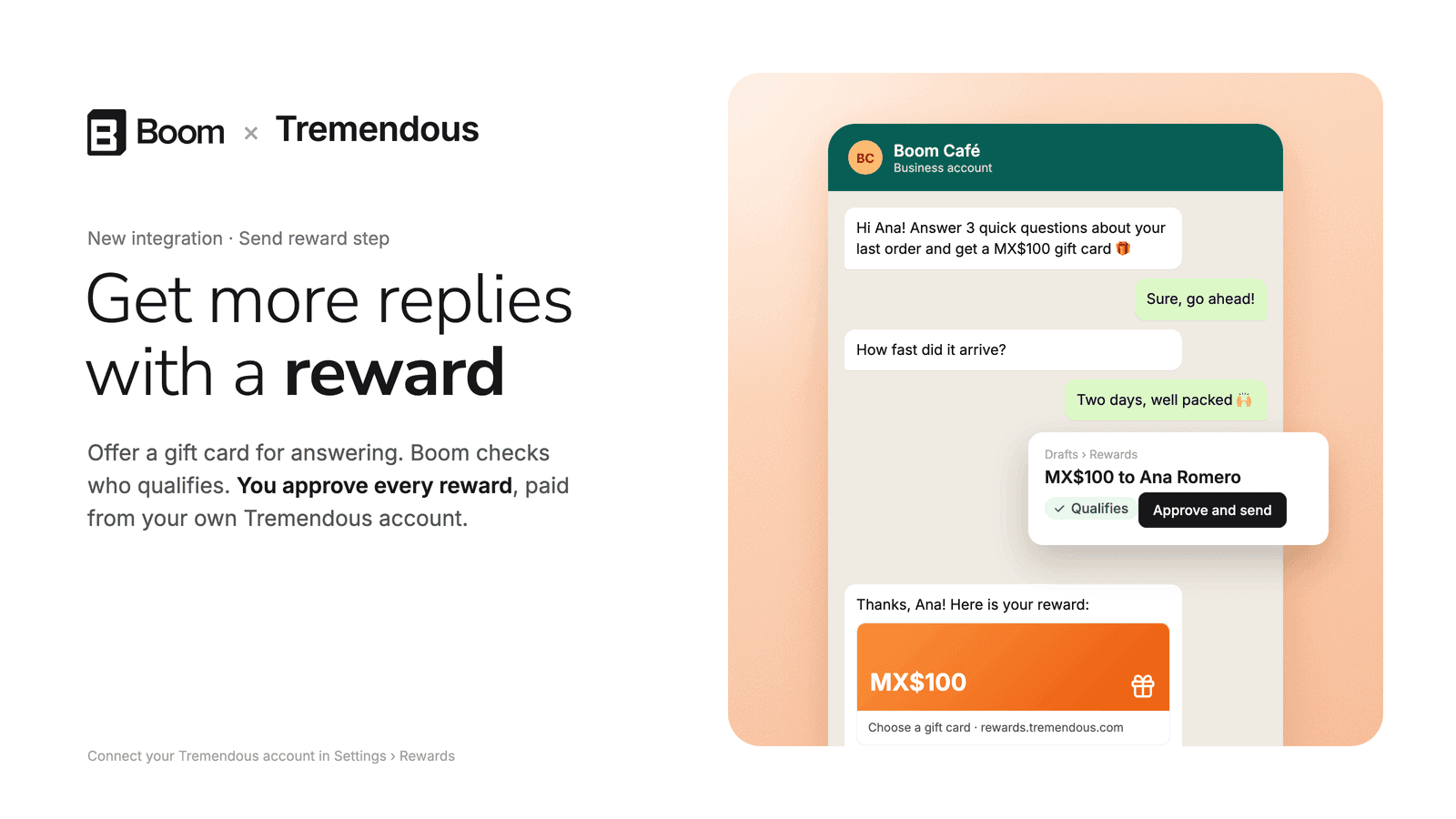
Journeys can now offer a reward for replying. Add a Send reward step, set the amount in USD or MXN and write who qualifies in plain words. Boom checks each conversation against it, and every reward waits in Drafts until someone on your team approves it.
Rewards are paid from your own Tremendous account, which you connect in Settings › Rewards, where you also see your balance and create the WhatsApp reward message. The customer picks how to redeem it, for example Amazon or PayPal. See how it works.
A few smaller improvements from the last few days:
Make redeeming a coupon effortless: add a Copy code button to a call-to-action WhatsApp template so customers copy the code with one tap. The code can be fixed, like BUENFIN15, or a variable that is different for each recipient.
It works in the template builder, the REST API (POST /api/v1/templates), the MCP templates_create tool and Sidekick. The button is available on Marketing templates only, one per template, with a title of up to 20 characters. WhatsApp limits codes to 15 characters: if a recipient's code is longer, that send is skipped and the journey editor warns you.
A few minor improvements from the last few days:
Uploading a list of people now lives in its own Enrollment section instead of a dialog tucked inside the contacts tab. Each step has its own page (upload, map columns, review, confirm) so a large import is easy to follow, and the AI column mapping suggests which column is the phone, the name, and the rest as you go.
Every workspace now has Home, the dashboard that shows the revenue attributed to Boom, your conversation volume, and how much of it your agent handled on its own. It is on for everyone with dashboard access, with no setup to do, and a full year of history fills in by itself so the charts are useful from day one.
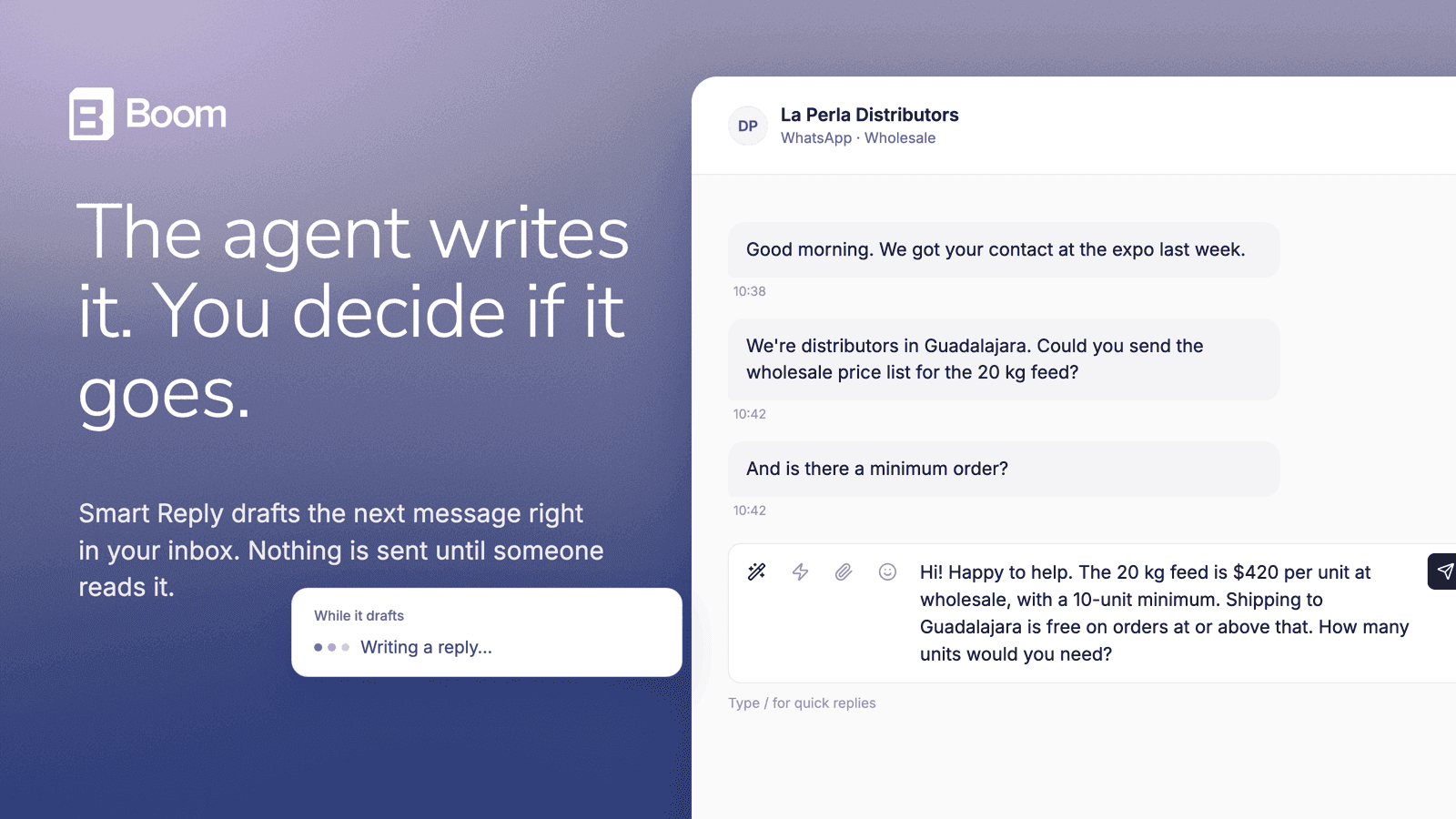
You can now ask your agent to write a draft reply in the inbox. Smart Reply is a button in the composer row: press it and the text shows up in your box, ready to edit and send. Nothing goes out on its own.
It is written by the same agent you already have configured, reading the whole conversation and the customer's context. It shows up in the composer of any conversation you can reply to, and it needs your workspace's agent to be configured. See how it works.
A few smaller improvements from the last few days:
Boom now brings storefront browsing from Shopify into your customer data, so you can reach shoppers who viewed products and left without adding anything to the cart. Turn the Storefront tracking pixel on or off for each store from its Shopify source page.
Journeys have a new decision condition: did the person do something since entering (for example, view a product or add to cart)? Use it to stop a message when the shopper comes back, or to hand them from a site abandonment follow-up to a browse abandonment one. Ready-made site abandonment and browse abandonment journey templates get you started.
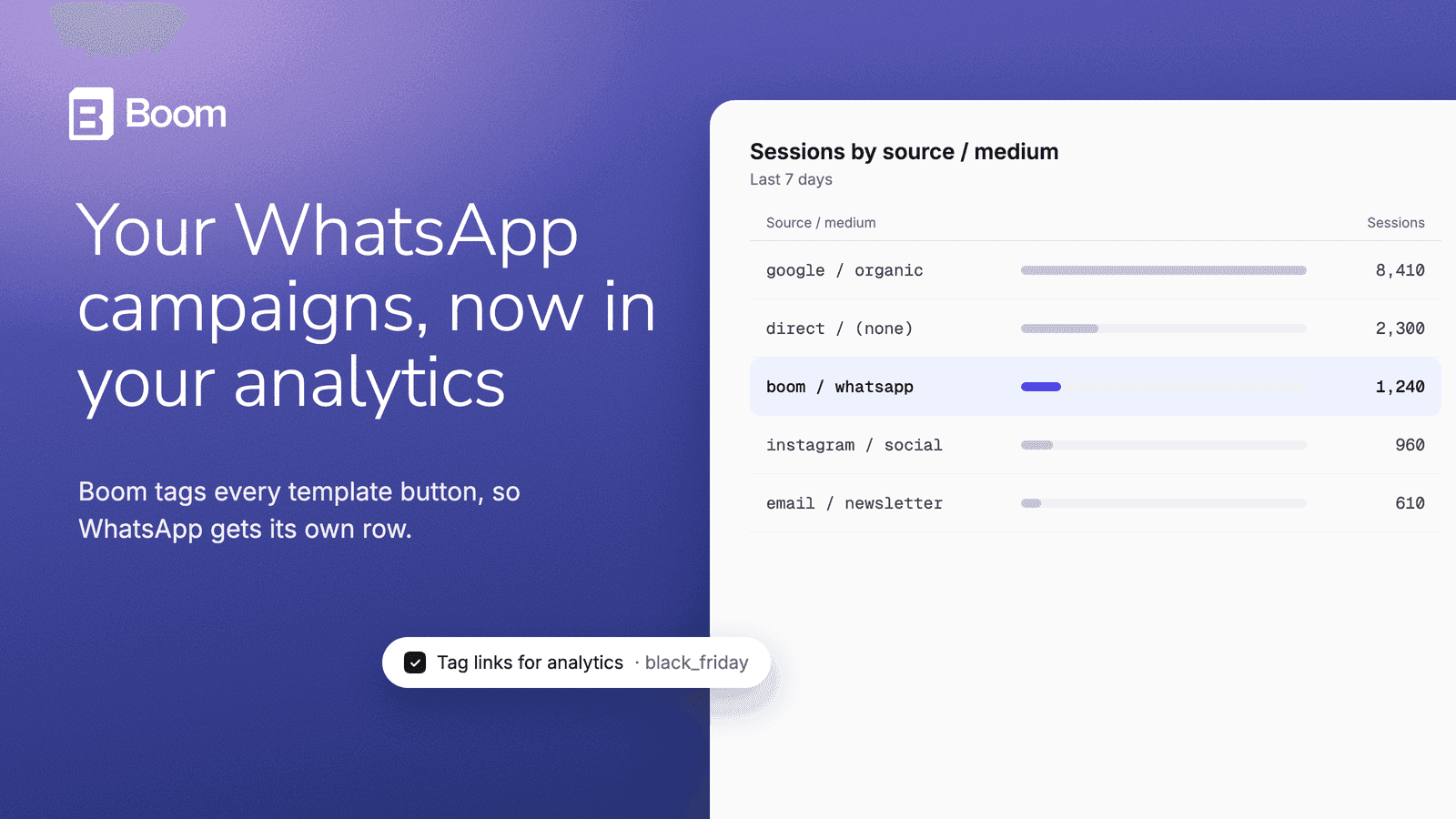
New WhatsApp templates now add UTM tags to their link buttons: utm_source=boom, utm_medium=whatsapp and the template's name as the campaign. Visits that used to show up as direct traffic now arrive with their campaign, so you can see which message brought sales and double down on it this peak season.
Tag links for analytics is ticked by default under the buttons when you create a template, and Customize changes the tags. You can edit them later without a new WhatsApp review. It's on for every workspace. See how it works.
A few smaller improvements from yesterday:
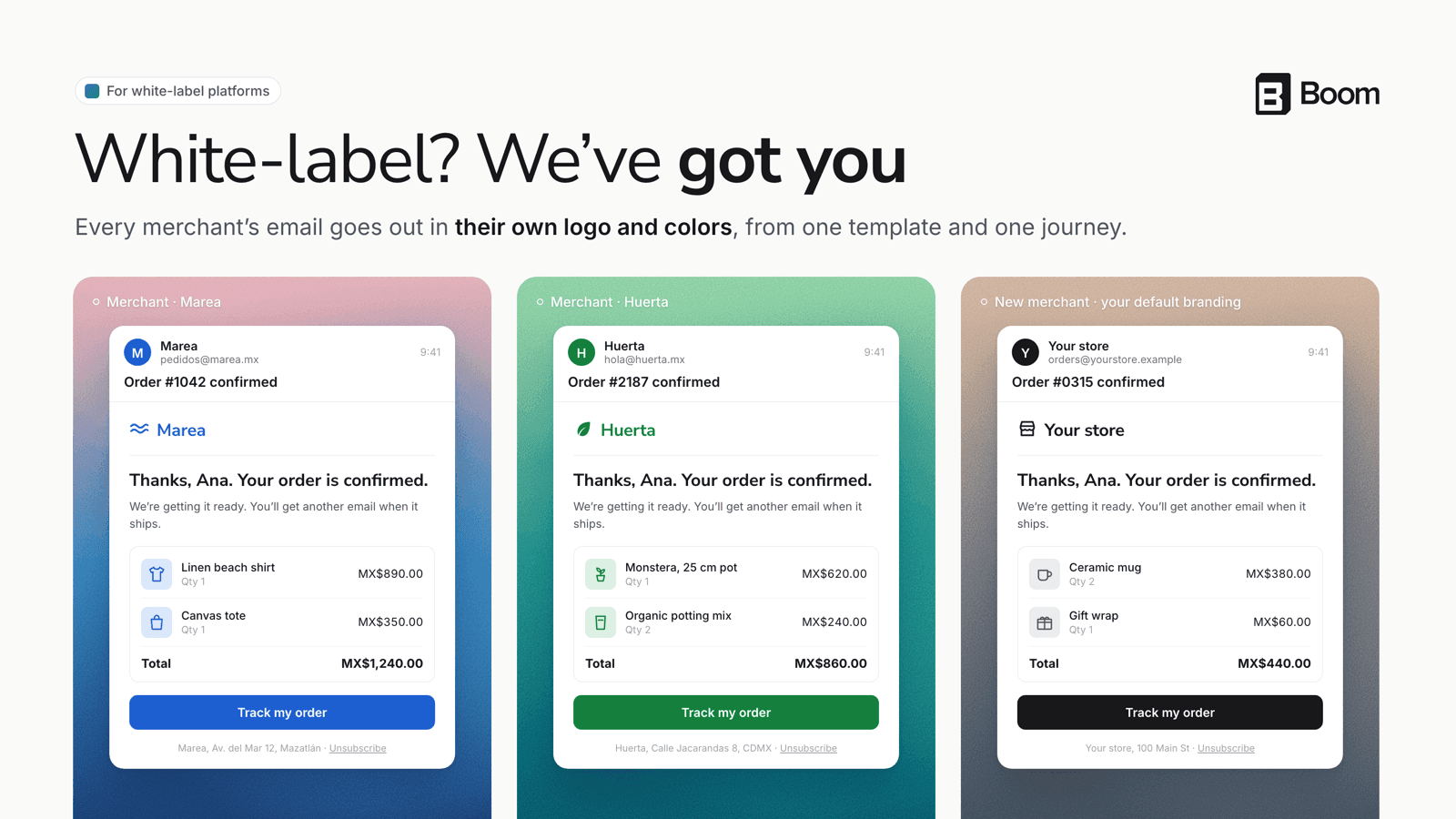
A new journey step, Look up record, loads a custom object, like a merchant's brand or the order an event names, and saves it under a name later steps read, such as {{brand.logo_url}}. In the email editor, any color or image can now use a variable, with your own choice as the fallback.
Together, one journey and one template send each merchant's email in their own logo and colors. A merchant with no record gets your default branding, and publishing checks that the email only reads fields the step loads. See how it works.
Catch up on a long thread in seconds: ask for an AI summary of any conversation in the shared inbox, written in your language. Nothing is stored, and internal notes are left out. You can also close a conversation nobody owns, such as an escalated one, without assigning it to yourself first.
A journey can now fetch data from one of your objects while it runs, so the next message uses fresh details. The new Look up record step finds a record by a value the run already carries, or through the person's related records, and hands the attributes you pick to any later step: an email, a WhatsApp, a decision or an HTTP call. It has Found and Not found exits so you decide what happens in each case.
In the email builder, any color or image can be tied to a variable with a fallback, so one template shows each store's own logo and colors. Look up record is turned on per workspace.
Link buttons in your WhatsApp templates can now be tracked. Boom adds UTM tags to the button link at send time, and the template page shows how many people tapped, as "N of M people". Create and edit tracked templates from the app, the API or MCP; templates you already have stay unchanged.
A few smaller improvements from yesterday:
<key>_labels, and screen readers announce the current step.+52 or +521.The agent can now apply your existing inbox labels to a conversation, so your team sees at a glance who is interested or who declined, without the agent closing or resolving the chat. It only uses labels you already created, never invents new ones, and never mentions them to the customer. Turn it on per workspace.
Lead Capture pop-ups grow well beyond a single email field. A quiz question can now take several picks with an ordered answer a journey can branch on, the form can run as steps (email, then an optional WhatsApp step you can skip) with consent asked per step, and a pop-up can open on a delay or when the visitor scrolls, with a cooldown so the same person is not asked too often. A tab on the edge of the page lets a visitor who closed the pop-up reopen it, and a progress bar plus design polish round out the look.
A few smaller improvements from this week:
You can now collect and show customer reviews on your store. Reviews › Widgets is a studio: pick a widget (product reviews, a star badge, a carousel, a gallery, or an all-reviews page), see it live on sample reviews, shape its look, and publish. Each widget is a self-contained storefront element with photos, a lightbox, sorting and a summary, and a setup checklist walks you from install to live.
You can now collect and show customer reviews on any store, not only Shopify. Your store sends its products and orders through the commerce API and you add a small website snippet, then Boom asks buyers for a review after delivery and shows the results with ready storefront widgets: a carousel, a full reviews page, a gallery and a star badge, with a photo lightbox.
Design each widget live in the Widgets Studio before you publish. Ratings flow into your CDP and feed AI product summaries, you can reward photo reviews with a gift card (clearly labelled as incentivized), and low ratings can escalate to your team with a playbook for what to do next.
Initiative analytics can now show ROI: the sales attributed to a success metric divided by what the journey's messages cost. Turn it on per success metric, off by default and only for metrics that add up a value, since an average or a count is not revenue, and a KPI tile shows the return next to your other numbers.
Journey analytics now shows the ROI of a success metric: the sales it attributed divided by what the messages cost to send. Turn it on per metric, and when the metric adds up to a value in money and something was sent, a KPI tile shows the return next to the result.
A smaller update:
Your customer journeys can now draft and continue: a message is prepared and held for a teammate to approve or reject, while the rest of the journey keeps running for that person. It sits alongside Send now and Draft and wait in the builder, drafts expire on a window you set (1 to 30 days), and a new Drafts tab lets your team send or delete what is queued. You can drive it from the API and the MCP too.
You can now preview and test-send an email template on a real event's payload, so loops like {% for %} render with actual data instead of coming back empty. A new test panel lets you map each template variable to a recent event or a row from a segment, sensitive keys stay masked unless you have permission to read them, and the same preview is available over the API and the MCP with email_templates_preview. Fewer broken templates reach your customers.
A smaller update:
{{ items.size }} correctly, and previews now greet the person from the event.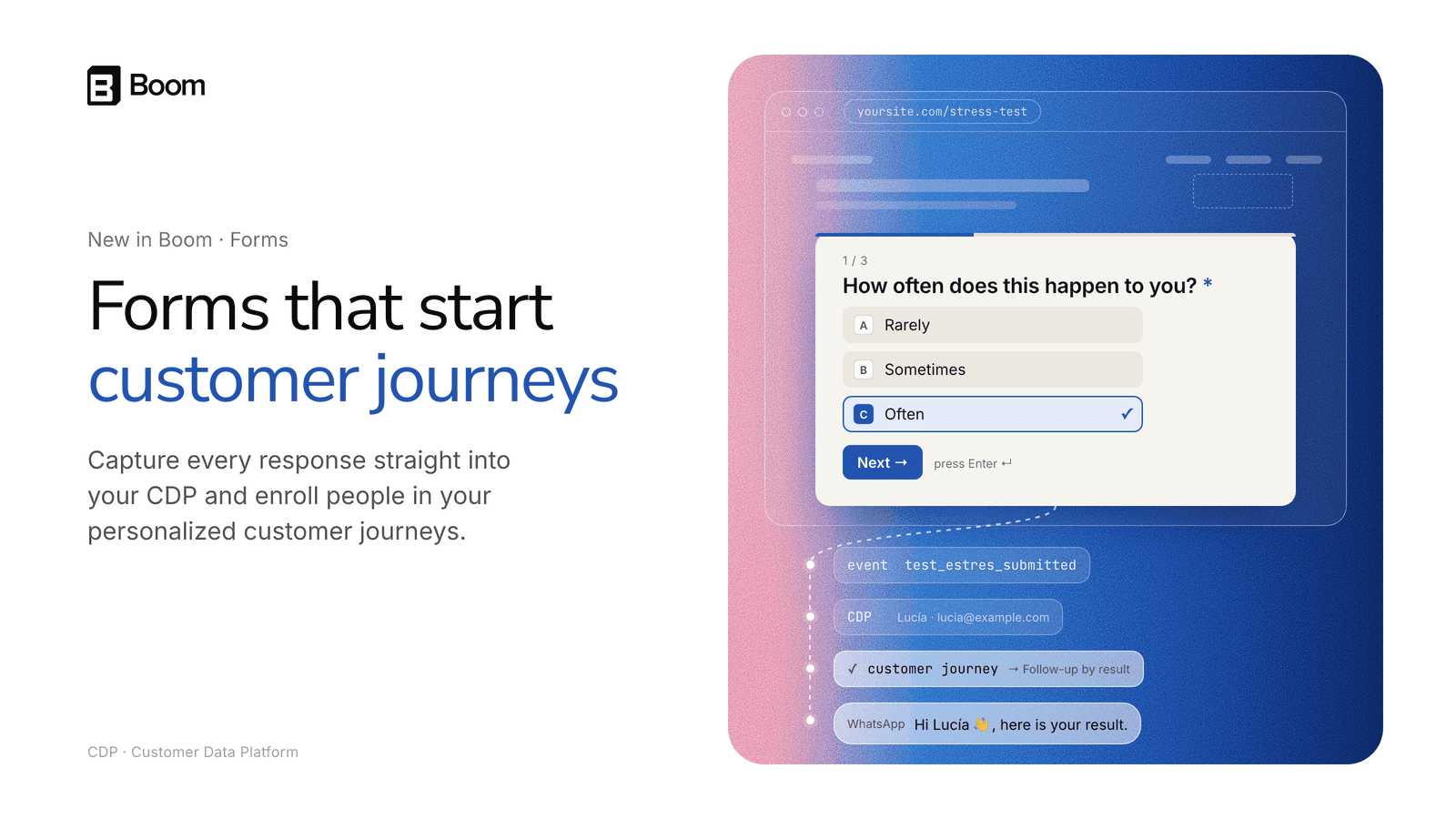
You can now build embedded forms in Settings › Lead Capture: a test, a sign-up or a request with steps, optional scoring and an ending for each result, on your own page. Each response creates or updates the person in People and records an event, such as test_estres_submitted, that a customer journey can start on within seconds.
Sensitive questions are stored encrypted and never travel on the event, and from a response you can withdraw consent or erase everything. Embedded forms are turned on per workspace. See how they work.
Transactional initiatives, the messages your app triggers through the API, can now wait for approval. Turn on Review before sending and each message is prepared in full and held in a Drafts tab for your team to preview and approve or reject, the same control your customer journeys already have. Approved messages go out exactly as previewed. You can set it on the initiative or through the API and MCP with reviewBeforeSending.
A smaller update:
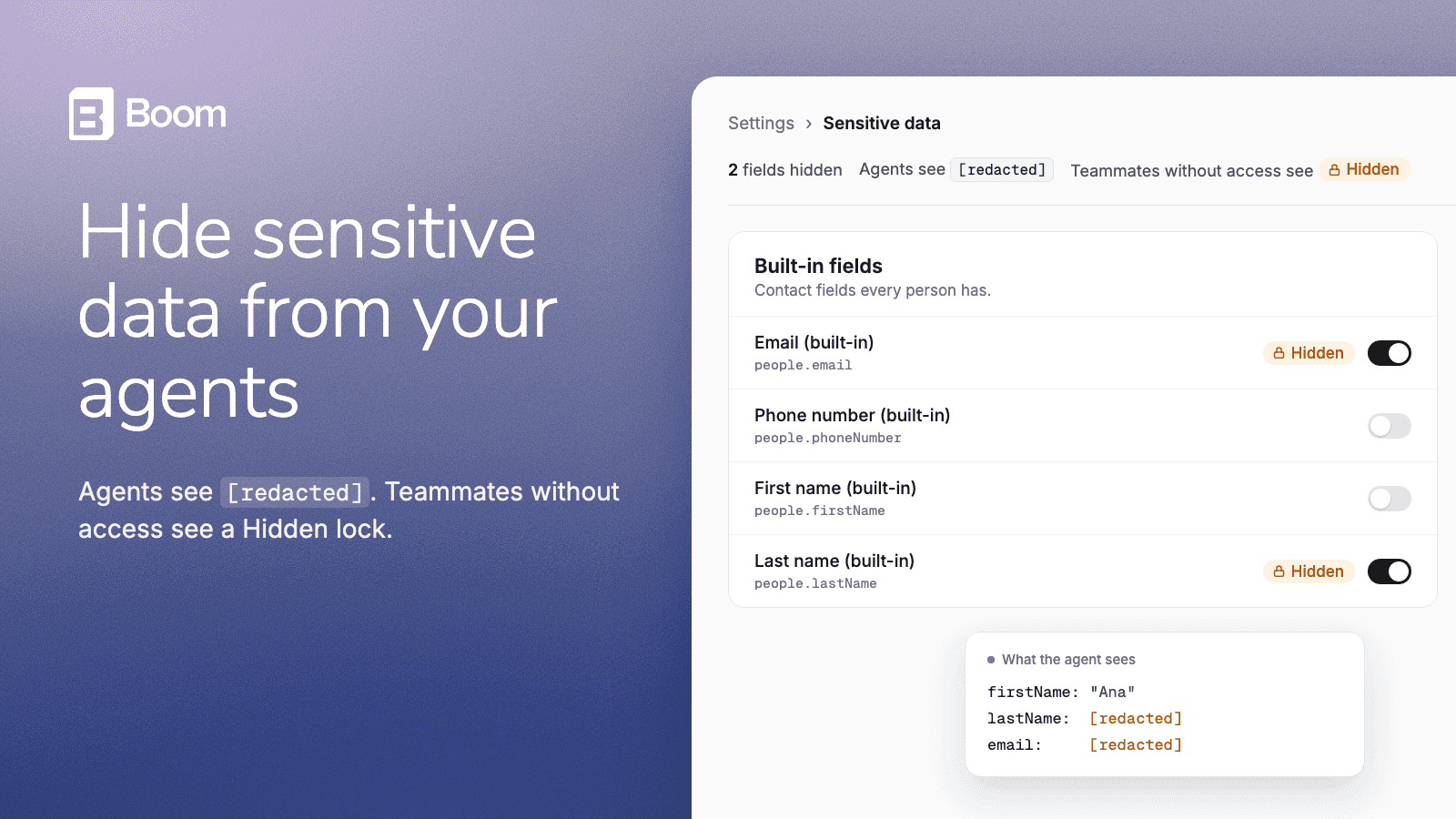
You can now hide sensitive customer fields in Settings › Sensitive data. AI agents see [redacted] instead of the value and never ask for it, and teammates without access see a Hidden lock. Owners, Admins and Developers still see the real value.
A hidden field is still stored and keeps working in segments and messages. You can hide contact fields, people attributes and custom object attributes. Sensitive data is turned on per workspace. See how it works.
A smaller update:
Lead Capture turns a site visit into a contact. Add a pop-up to your store that collects an email and a WhatsApp number, optionally behind a quick game that reveals a promo code, and a journey welcomes the new lead in seconds. New leads land in your People list and can trigger a journey right away, and you can manage pop-ups and read leads from the dashboard, the API, the MCP, and the in-app assistant.
A few smaller updates:
Email templates now support Liquid, so you can personalize a message with a contact's data and set a fallback for each field when the data is missing. Preview the rendered email inside the node as you build it, and when something in the Liquid is off you get a readable error over the API and the MCP instead of a silent failure.
A smaller update:
Saving a person through the People API (or the MCP) now updates only what you send. Attributes and contact fields you leave out keep their value, and an attribute sent as null is removed. If you always send the complete profile and want anything missing cleared, pass "mode": "replace".
A smaller update:
A smaller update:
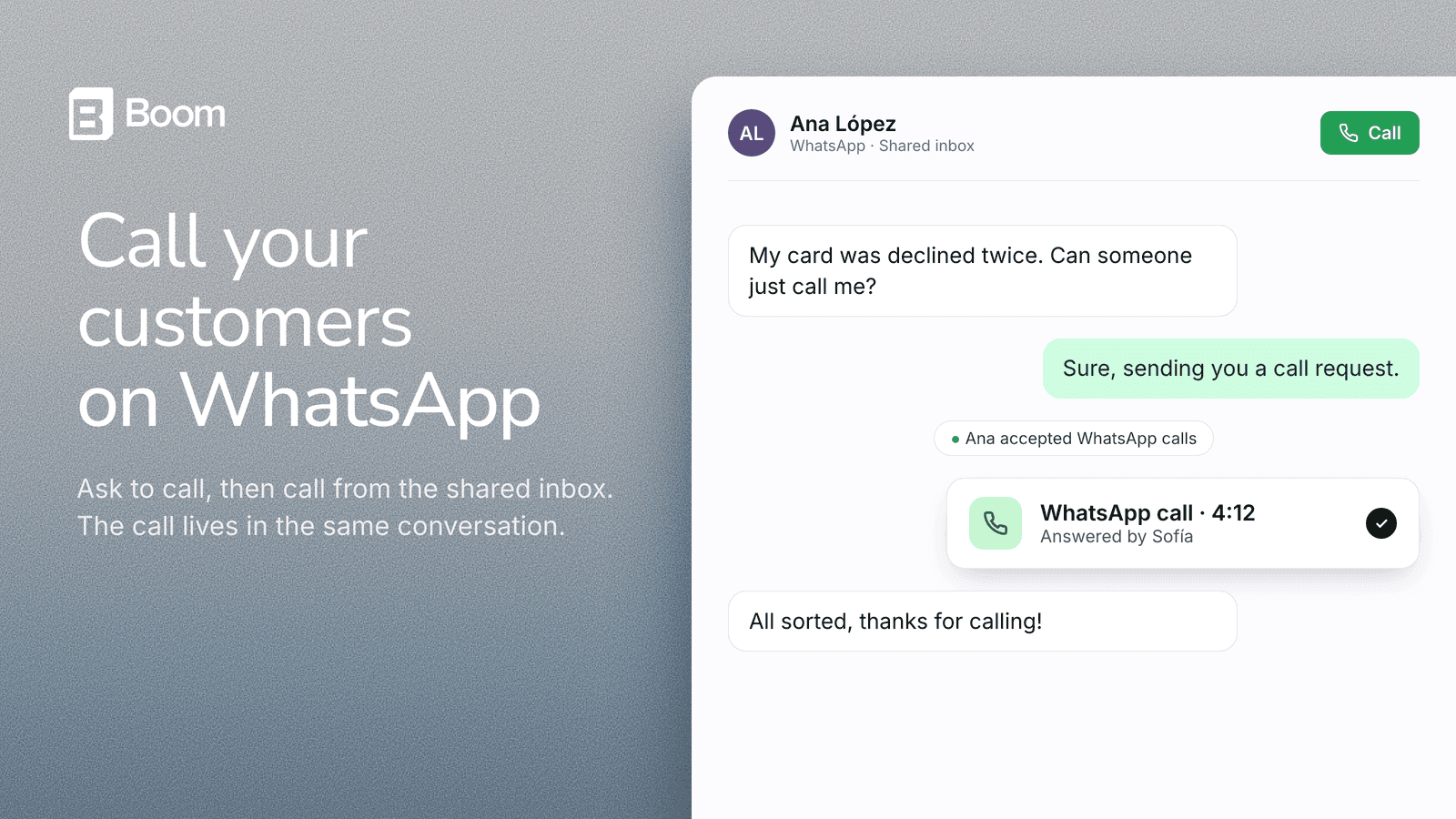
You can now call customers on WhatsApp from the shared inbox. When a conversation needs a voice, press Ask permission to call and the customer gets a WhatsApp request to accept calls from your number. Once they accept, the button turns into Call and you talk from your browser, with no phone or extra app.
Every call is saved in the same conversation, so your team sees the whole history in one place. Calling is in early access and is enabled per WhatsApp number. See how to turn it on.
A smaller update:
A smaller update:
A smaller update from this week:
A journey that starts from a segment can now re-read the record that put the person in it. The new Matched record (live) condition in a Decision tests the record's current values, so you can ask "is the order that enrolled this person still pending_approval?" and stop the reminder once it moved on. In a Case, pick Matched to branch on the record's current value. If the record was removed or no longer exists, the person follows the default path.
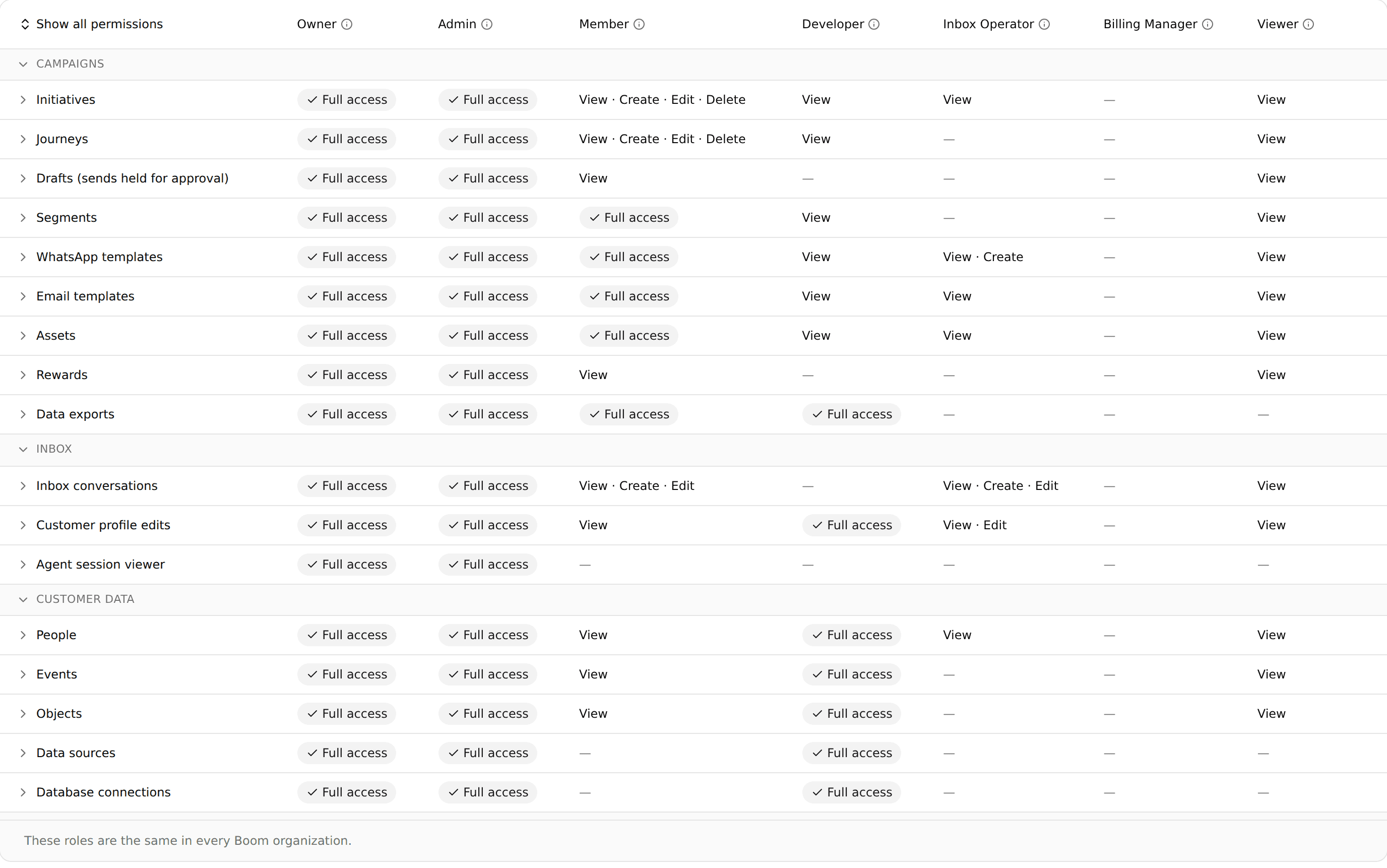
Boom now has seven standard roles: Owner, Admin, Member, Developer, Inbox Operator, Billing Manager and Viewer. Each person has exactly one, and it decides what they can launch, publish, approve, export and send as rewards, in the app, through the API and in the assistant. Buttons a person cannot use are hidden or disabled instead of failing with an error, and each role lands on a page it can use: Inbox Operators open the inbox, Billing Managers open billing.
Owners and Admins can see exactly what every role can do in Settings › Organization › Roles. Expand any row to see the individual actions. Change someone's role in Organization › General › Members.
A handful of smaller customer-facing improvements:
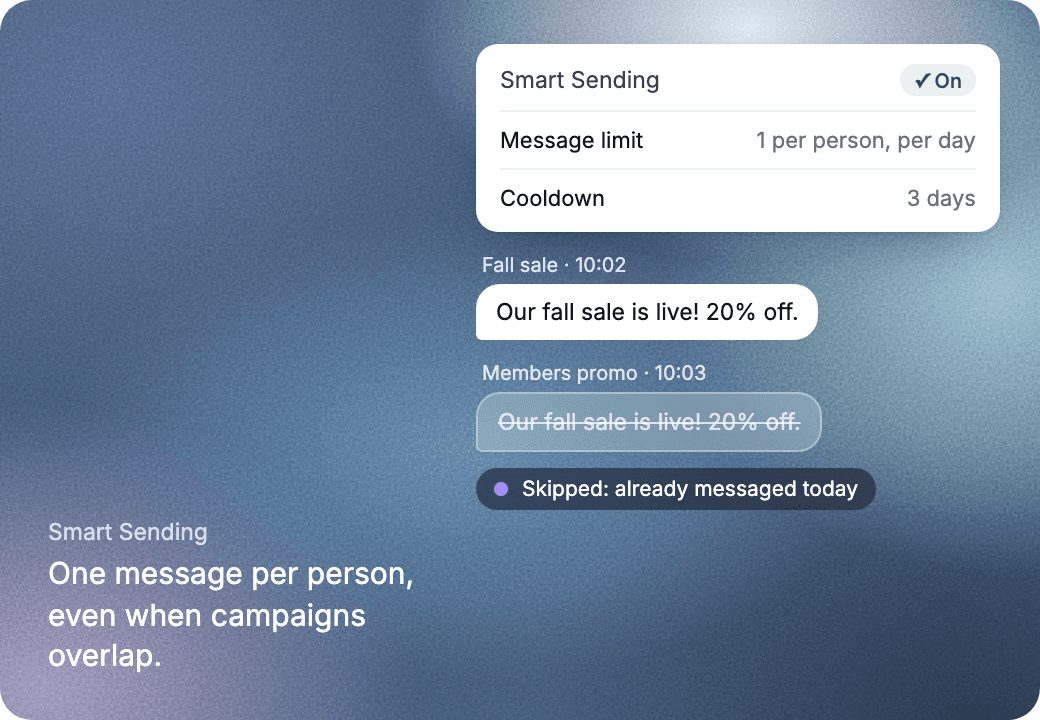
Campaigns, reminders and follow-ups each make sense on their own, but your customer gets all of them. Smart Sending lets you control how often each customer hears from you, across everything you send from Boom. Set it once in Settings › Smart Sending:
The agent's replies never count, so a customer who writes always gets an answer. Before you turn a limit on, Boom shows which initiatives would lose messages, and afterwards every skipped run is labelled in Executions with the rule that stopped it. See how one brand sent 72,600 messages without anyone getting the same promo twice in the story, or learn how it works.
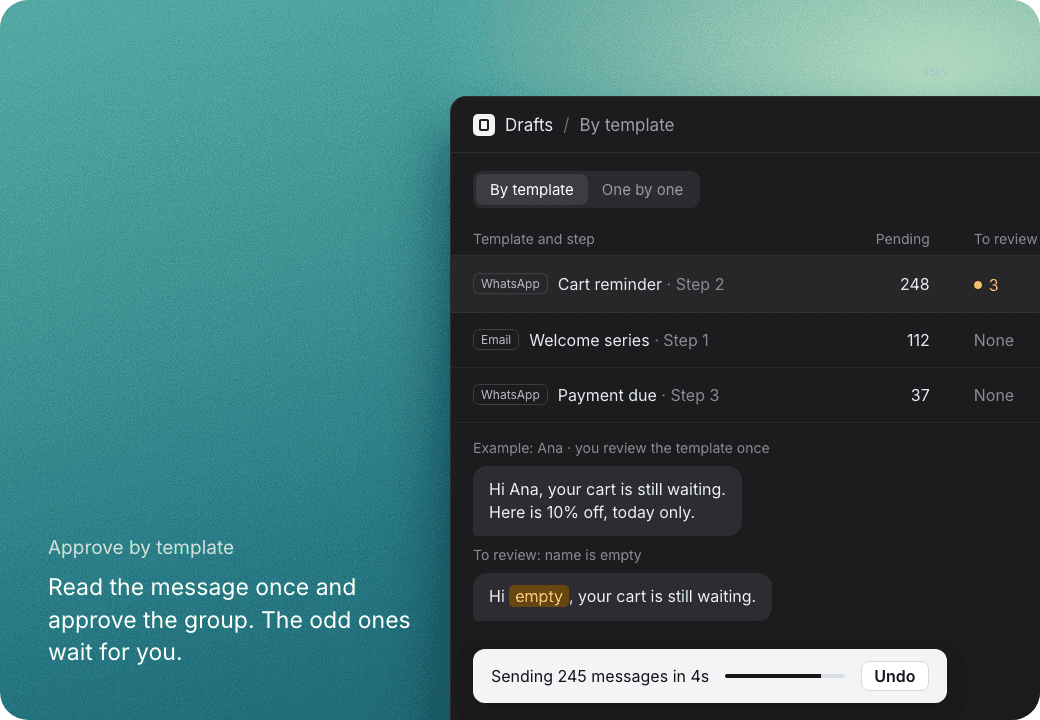
A journey's send step can now wait for approval. Set its Delivery to Draft for approval and each WhatsApp template or email it would send is prepared in full and held in the initiative's new Drafts tab. Your team previews the exact message, then approves or rejects it one at a time, in a selection, or everything matching a filter. Approved drafts go out exactly as previewed, and rejected ones send nothing and can follow their own Rejected path in the journey.
Reviewing is built for volume. The By template view groups the drafts that share a template and step, so you read the message once and approve the whole group. Drafts where a WhatsApp variable came out empty or at zero are marked To review and left out of a group's approval or Approve all until you include them. Every approval waits 5 seconds before anything is sent, so you can undo it, and the tab then shows what was sent.
A journey can now run a separate copy for each value of an event property, for example one run per payment link. Turn it on with a field in the builder, and a stop event cancels only the matching run instead of the whole journey. Existing journeys keep working exactly as before.
Boom can now send transactional initiatives, messages triggered by an event in your app through the API, like an order confirmation or a payment reminder. Set one up on a single screen, launch it with one API call, and follow every message in its own analytics tab from sent to delivered to read. A dedicated API panel and a public guide walk your team through the setup.
A handful of smaller customer-facing fixes:
The message log now shows the real delivery state of every email, not just that it left Boom. Each email moves to delivered or failed as the provider reports back, a bounce or complaint shows its reason, and a hard bounce ends that person's journey so you stop sending to an address that cannot receive. You can also filter the log by channel to look at email on its own.
The web chat widget has a refreshed look, with a glass launcher and panel and smoother motion as it opens and closes. It is a visual update only, so your existing installation keeps working with no change on your side.
A batch of customer-facing improvements from recent releases:
Email is now a full channel inside Boom. Your journeys can send email, you can build and edit email templates from the builder or in HTML (and now through the API), you can send from several named addresses per organization and choose one per template or per step, and every marketing email carries a working one-click unsubscribe so you stay compliant with bulk-sender rules.
You can now reach customers on Facebook Messenger end to end. Connect a Facebook Page as a native channel, send Messenger messages from a journey the same way you already do on WhatsApp and Instagram, and let a Messenger message start a journey so a conversation can begin the moment someone writes to your Page.
Boom now tracks Shopify carts as data you can act on. A created cart can start a journey and a completed checkout cancels it, so you can follow up on an abandoned cart automatically, and your agent can read seller-defined product details (like a shoe's fit guide) that were not available before.
A comment on your Instagram or Facebook post can now start a conversation. When someone comments, Boom enrolls them into a journey without waiting for a direct message, and because a comment does not open a messaging window, the flow sends a private reply to that comment so the person still hears back instead of dropping out silently.
A batch of customer-facing improvements from recent releases:
A batch of refinements from recent releases:
.csv file uploaded from Windows is now stored and read as a spreadsheet, instead of being misread as a legacy Excel file.Every template and journey email now supports one-click unsubscribe, using the same header major inbox providers like Gmail and Yahoo look for on bulk senders, so opting out takes a single click instead of a reply. Add the {{engagement.unsubscribeLink}} variable to any email footer to link straight to it.
A journey can now start when someone messages your Facebook Messenger page, the same way it already can from WhatsApp, SMS or Instagram. Set an entry point to listen for any message or a specific keyword, so a customer reaching out on Messenger enters the right journey automatically.
Connecting a Meta channel now lets you pick exactly which Facebook Pages to bring in, so a workspace only connects the Pages it actually owns instead of every Page available. And when a Meta channel's connection expires, a Reconnect button now shows up right on that channel's row to restore it, instead of leaving it stuck.
Your organization can now hold several named senders for email, each with its own display name, From address and Reply-To, instead of one shared sending address for everything. Pick the sender per template or per journey email step, see exactly how it will look in a customer's inbox from the new Senders tab, and check which sender each step sends as right on the journey canvas.
A batch of refinements from recent releases:
Email footers can now include social icons. Add a row of linked icons for Instagram, Facebook, TikTok, X, LinkedIn, YouTube and WhatsApp, set each profile link, and choose the alignment, size, spacing and style (brand colors, dark or light). The block nests inside containers and columns like any other, so you can build a complete footer without leaving the email builder.
A batch of customer-facing refinements from recent releases:
.html file straight into the composer.@ picker, and read or set an initiative's success metric over the API.The email template builder now has a code mode alongside the visual editor: write raw HTML, format it, drop in an .html file, and copy the source back out. You can also test a template against a real person from your CDP, so you see exactly how the variables resolve before anything sends.
Boom now supports Facebook Messenger as a native channel: connect your Facebook Page and the agent sends and receives Messenger messages through the same journeys and inbox as your other channels. Messenger connect sits right next to Instagram and WhatsApp in your channel settings, so every conversation your customers start reaches the same place.
A batch of refinements from recent releases:
You can now test an email template against a real contact from your CDP. Pick a person and see the template rendered with their actual data before you send, so variables and personalization are verified against real values instead of placeholders.
A batch of customer-facing refinements from recent releases:
.html file dropped, pasted or picked, not only images and documents.When you write an initiative's instructions, you can now reference a tool or a guiding question by picking it from a menu with @ instead of typing its name. A referenced tool or question stays linked to the real one, so renaming it keeps working and a typo can no longer point the agent at something that does not exist. It works in both the context and the objective.
An HTTP request node in a journey can now choose which file types it sends. When a step forwards a customer's uploaded documents to your endpoint, you can restrict it to the formats that endpoint accepts (for example, PDF only), so files it cannot read are never posted. The option sits with the node's other advanced settings and lists the exact types, and existing journeys keep sending everything unless you narrow it.
The assistant now sees the image you attach, not a description of it. Hand it a screenshot of an email design and it can rebuild that design as HTML, and the file you send now appears inside your own message in the conversation instead of disappearing once the turn ends.
You can now write an email in HTML instead of stacking blocks. A code editor lets you paste in a design, format it with one click so a model's single line of markup becomes readable, and copy the source back out to keep iterating. The template gallery now leads with Start blank and Write HTML cards so both starting points are obvious, and the approval card renders an HTML draft the way it will actually send, naming anything the sanitizer removed so nothing is lost quietly.
A batch of refinements from recent releases:
Email templates can now be authored in HTML directly: choose code mode when you create a template, write the markup yourself with a live preview, drop in {{variables}} that resolve at send time, and let the AI assistant draft the HTML for you to refine. The drag-and-drop builder also gained real layout, so you can nest blocks inside containers and arrange them in side by side columns, and undo and redo protect your edits. Every template you save is ready to reuse in a journey or a broadcast.
A batch of refinements from recent releases:
A batch of refinements from recent releases:
A relationship row in the customer directory now expands in place to show the related record's details, so reading what a linked record holds no longer means leaving the profile you are on. The arrow on the right still opens that record's own page, so you can glance inline or navigate, whichever you need.
Your journeys can now send Instagram messages, not only listen for them. A flow can reply to a customer's Instagram DM and keep the conversation going on the same channel, so an Instagram journey works from the first message through to the last instead of stopping after the first inbound message. The builder also guards what Instagram enforces: it warns as a message nears Instagram's length limit and blocks publishing one that is too long, and a send Instagram will not accept (for example, one outside the allowed messaging window) now fails fast and is reported clearly instead of being retried and marked as delivered.
A batch of refinements from recent releases:
A couple of billing accuracy fixes from this release:
A batch of refinements from recent releases:
\n in a JSON body as real line breaks, and shows its variable chips more clearly.{{person.phone}} variable now resolves, and a blank value says so plainly instead of sending an empty token.A journey can now branch on how a conversation closed, so what happens next follows the real outcome (the customer reached the goal, asked to stop, or went quiet). The close reason is saved as a step output you can reuse downstream and is reported on the journey_run.ended webhook, and the builder now lays out one branch per close reason for you instead of asking you to type each value by hand.
Boom now supports Instagram as a native channel: connect your account and the agent sends and receives Instagram direct messages through the same journeys and inbox as your other channels. Instagram and Messenger both appear on your channel settings overview, so every connection lives in one place.
A journey can now route a customer from one initiative into another partway through, so you can hand a contact from an onboarding flow into a research flow without starting over. The receiving initiative picks up the conversation in context.
A few refinements from this release:
Journeys can now include a step that sends a free-text WhatsApp message you write yourself, not only a pre-approved template. The builder flags when the 24-hour messaging window is closed, so you always know when a template is still required.
A smaller refinement from this release:
A few smaller fixes and refinements from this release:
One phone number can now serve several journeys at once. Keyword routing sends each incoming message to a different journey based on what the customer writes, so price can start your quoting flow while invoice goes to billing, with a catch-all for everything else.
A few smaller fixes and refinements from this release:
You can now reach customers over SMS straight from your journeys. A new send node composes the message and shows a live preview with the opt-out footer and the exact number of billable segments before anything goes out, so SMS reminders and campaigns can run right alongside your existing flows.
The web widget got a cleaner redesign: the visitor panel is now one tinted surface with the agent's replies sitting directly on it, and the launcher comes in two styles so it stands out on any site. The refresh also improves color contrast and fixes several iOS keyboard and scrolling issues.
A few smaller fixes and refinements from this release:
A few smaller fixes and refinements from this release:
The web widget now supports images in both directions. A visitor can attach a photo for the agent to read, and the agent or an operator can send one back, all natively inside the panel. Images are proxied through Boom so nothing loads from a third party, and the inbox composer gains an attach button for widget replies.
You can now use Edit on an active or paused initiative to update its objective, guiding questions, and agent instructions, no need to pause or relaunch it. The change reaches the very next conversation, and removing a guiding question that already collected answers stays blocked to protect your data.
The web widget now offers a compact panel height, capped around 560px, so it can sit on your site like a chat card instead of stretching the full height of the page. Pick it from the widget's appearance settings; the default stays full height, and the mobile layout is unaffected either way.
A few smaller fixes and refinements from this release:
A few smaller fixes and refinements from this release:
A few smaller fixes and refinements from this release:
Campaigns now have their own section, separate from your recurring Initiatives: use one to reach a set of customers a single time, with a clear start and end, and get a report back. Your existing links keep working, so nothing you saved breaks.
A few smaller fixes and refinements from this release:
You can now narrow the inbox to the conversations talked to on a given day. The date filter offers Today, Yesterday, the last 7 days, or a custom range, so finding the right conversation no longer means scrolling the whole list.
When the AI agent escalates a conversation to a person, Boom can now tell your systems in real time. A new conversation.escalated webhook fires with the conversation id and a direct link to the Shared Inbox, so your team can step in without watching the inbox all day.
Building a journey now starts with a clearer entry. The entry trigger reads as a card at the top of the canvas, and its title tells you at a glance which trigger starts the journey. You configure it in a panel right beside the card, so setting up how a journey begins stays in one place.
Your journey analytics now show where success happens. The successes chart breaks down by outcome node, so you can see which ending each conversion reached instead of one combined total.
A few smaller fixes and refinements from this release:
You can now filter the People directory by any attribute: pick a key from your organization's attribute catalog, type an exact value, and the list narrows to the people whose data carries it. This makes it easy to find a specific person by a field like an RFC, a tier, or a user type, even across very large directories.
A few smaller improvements.

You can now duplicate an initiative right from the list, using its row menu. The copy lands in Draft with your full setup (context, questions, success metrics) but zero participants, so you can adjust it and launch without rebuilding from scratch.
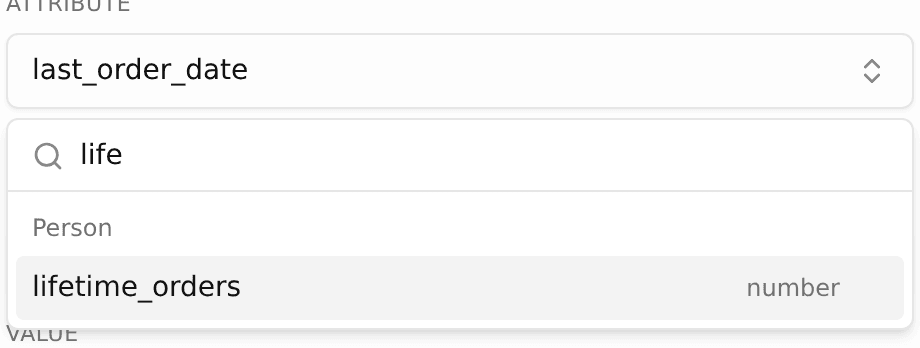
Every picker in the journey builder (WhatsApp templates, sending numbers, segments, variables, and more) is now searchable, so you can jump straight to the option you need instead of scrolling through a long list.
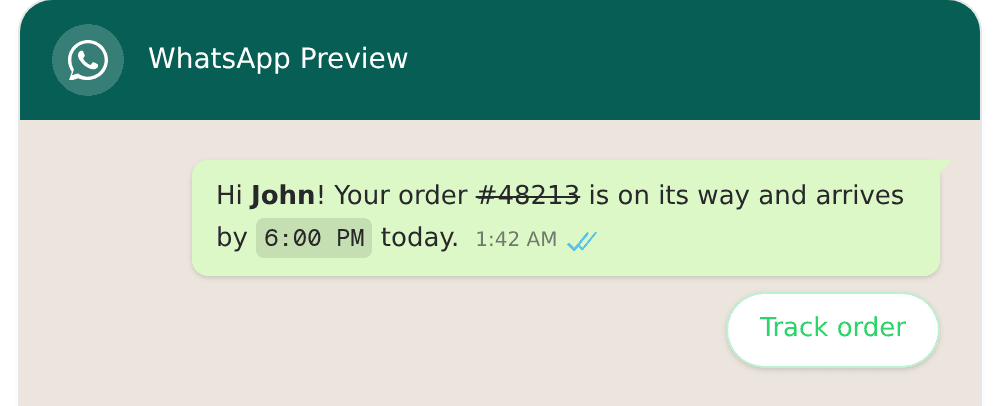
The WhatsApp template preview now renders real formatting (bold, italics, strikethrough, monospace, and lists), so you see exactly what your customers will receive instead of raw text. Buttons also now show up reliably while you're editing a template.
A few smaller improvements.
Journey analytics now shows per message and per path attribution, so your success metric is tied to the specific step and route that produced it instead of only the initiative total. A new attribution view in Routes shows how much each step contributed, and a Paths and outcomes section traces the route through the journey that earned the result, so you can see what is actually converting rather than just the aggregate.
A few smaller improvements.
A smaller improvement.
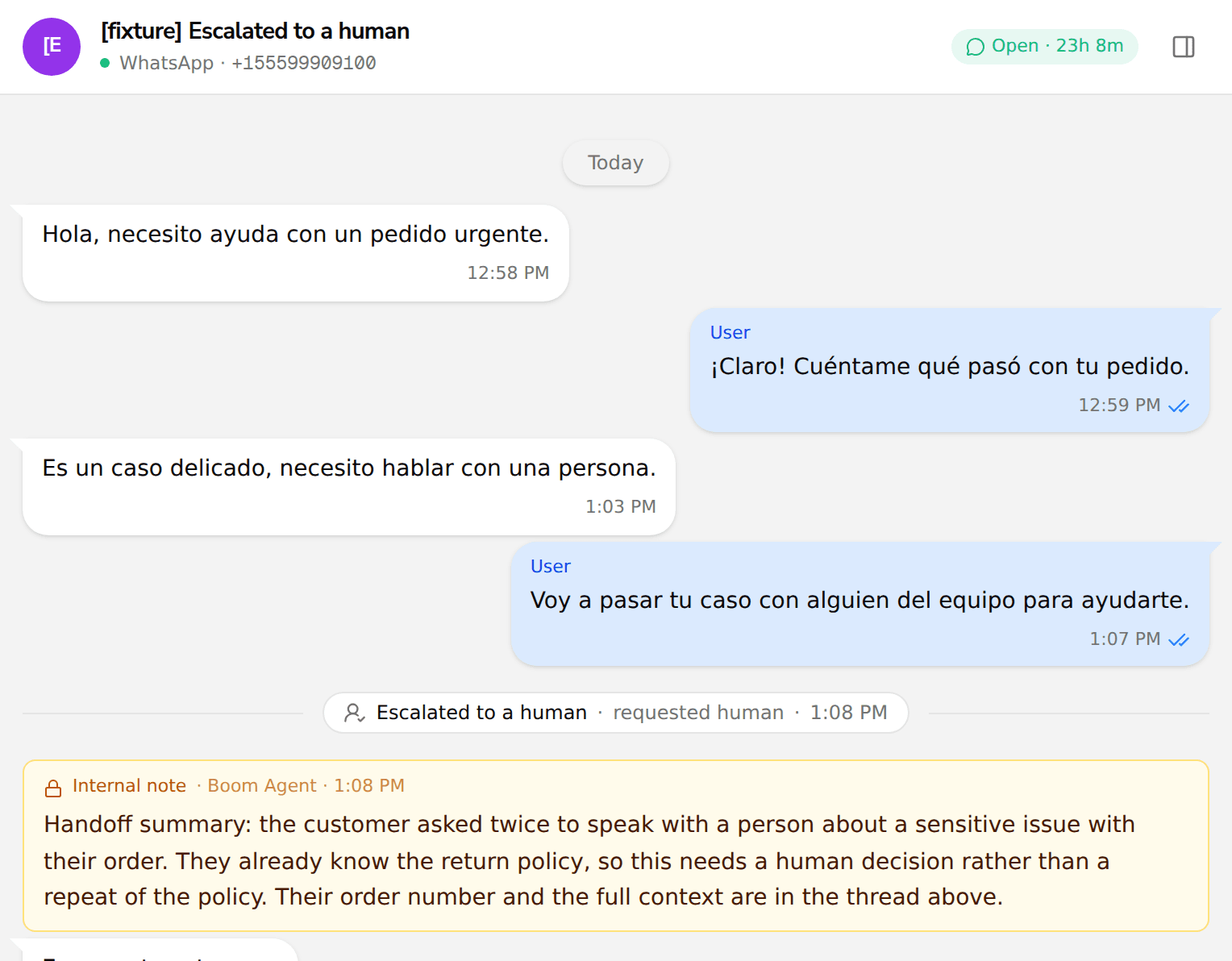
When the AI agent escalates a conversation to a person, the inbox now shows an internal note summarizing the handoff right in the thread. Your team can see that the escalation happened and why, without digging through other tools.
Your messages can now pull data from related records like orders and fulfillments, so a WhatsApp message can include the tracking number, order status, or shipping details directly. Before, a journey could filter on that data but not print it, which left blanks in the message; now the value resolves across the full path from contact to order to fulfillment.
Segments can now filter on the absence of a relationship, not only its presence. Build audiences like people with no completed checkout or no order in the last month, which makes abandoned cart and win back campaigns straightforward, and a negated condition can now carry its own filters for finer targeting.
A few smaller improvements.
Boom now ingests Shopify fulfillments and order transactions as first-class data. You can build segments and trigger journeys on what actually happened to an order: message a customer when their order ships, chase an expired or failed payment, or follow up after a refund. It works on your existing Shopify connection with no new permissions, and covers your stores right away.
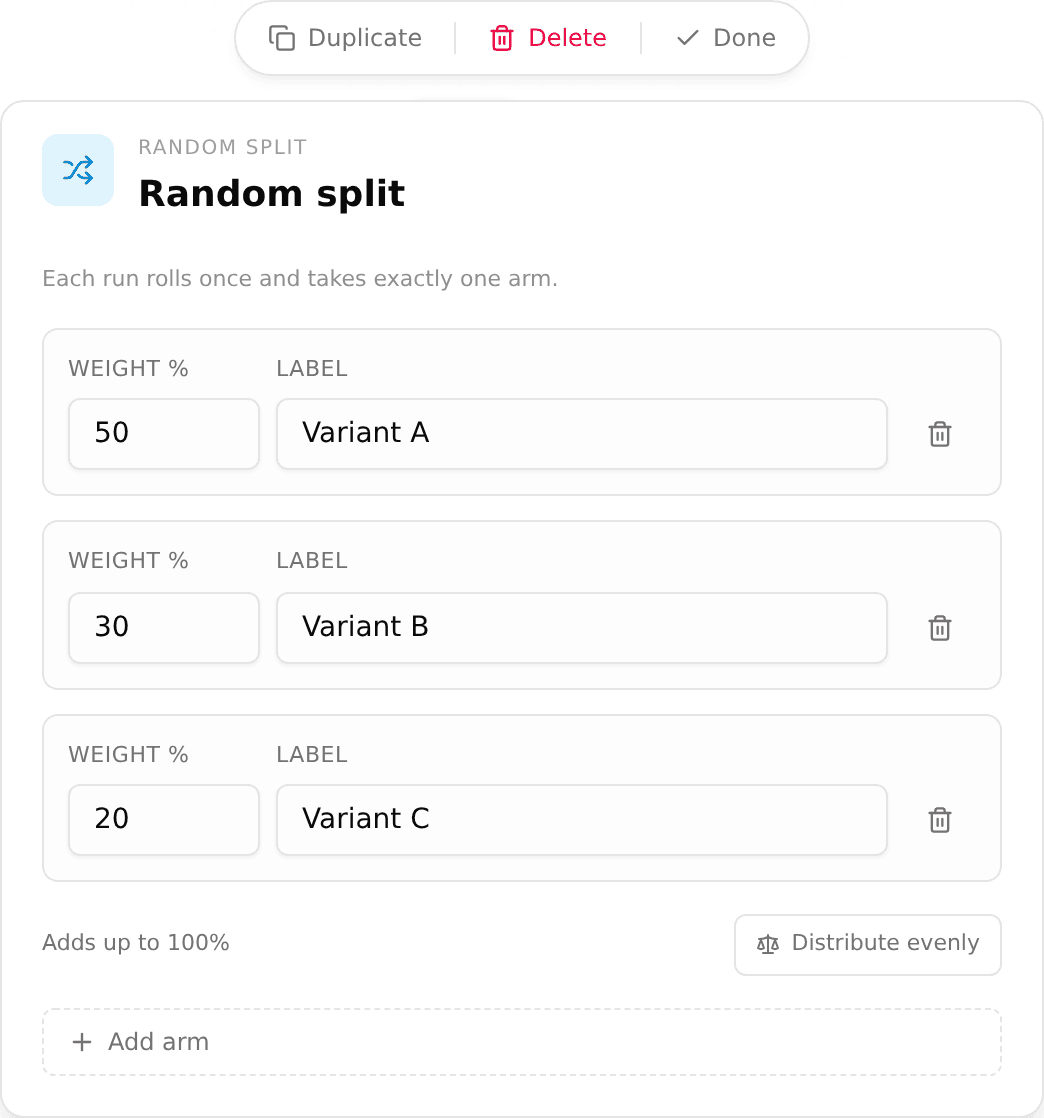
The new Random Split node lets you A/B test inside a single journey. Add it to the canvas, give each branch a share of your audience, and send different openers, delays, or agent modes to each group without publishing separate journeys or splitting your list by hand. Every contact is assigned once and stays on their branch even if a step retries, so the comparison stays clean. Per-branch results are coming next.
Leaving the journey builder with unsaved edits now stops to ask before anything is lost, with a clear Save and leave or Keep editing. A stray click to the sidebar or a closed tab no longer discards a journey you were still working on.
A few smaller improvements.
The journey builder now supports undo and redo on the canvas. Press Ctrl+Z to step back and Ctrl+Y to step forward through your edits, so an accidental change or a deleted node is one keystroke away from being restored instead of rebuilt by hand.
A few smaller improvements.
The new Message Logs page lists every message with its delivery status and the reason a send failed, and lets you search by recipient, so you can tell why something did not arrive without asking engineering. Delivery status is more accurate too, because out of order provider callbacks no longer roll a delivered message back to an earlier state.
You can now subscribe to outbound webhooks and be notified when a journey run starts, when it ends (with the reason, such as a node failure, a cancellation or a timeout), and when an enrollment is rejected. Webhook URLs support environment variables and resolve their own credential per environment, and you can send a test ping without launching a journey.
You can now export a conversation as a PDF from the shared inbox. Pick the time range you want, and the export leaves out internal agent notes so the document only shows the customer-facing exchange. It is handy when you need a clean, shareable record of a conversation, for example to show a payment processor that an exchange actually took place.
The agent no longer asks a customer again for something they already told it. It now reads the answers captured earlier in the conversation, so replies pick up where the customer left off instead of repeating questions.
You can now stop, pause, and resume a running campaign directly. Stopping retires a campaign so it takes no new contacts, without having to publish a replacement. Pause holds a campaign and resume picks it back up later. In every case, conversations already in progress finish on their own. The controls are available in the builder, on the initiative, and through the API.
A few smaller improvements from today.
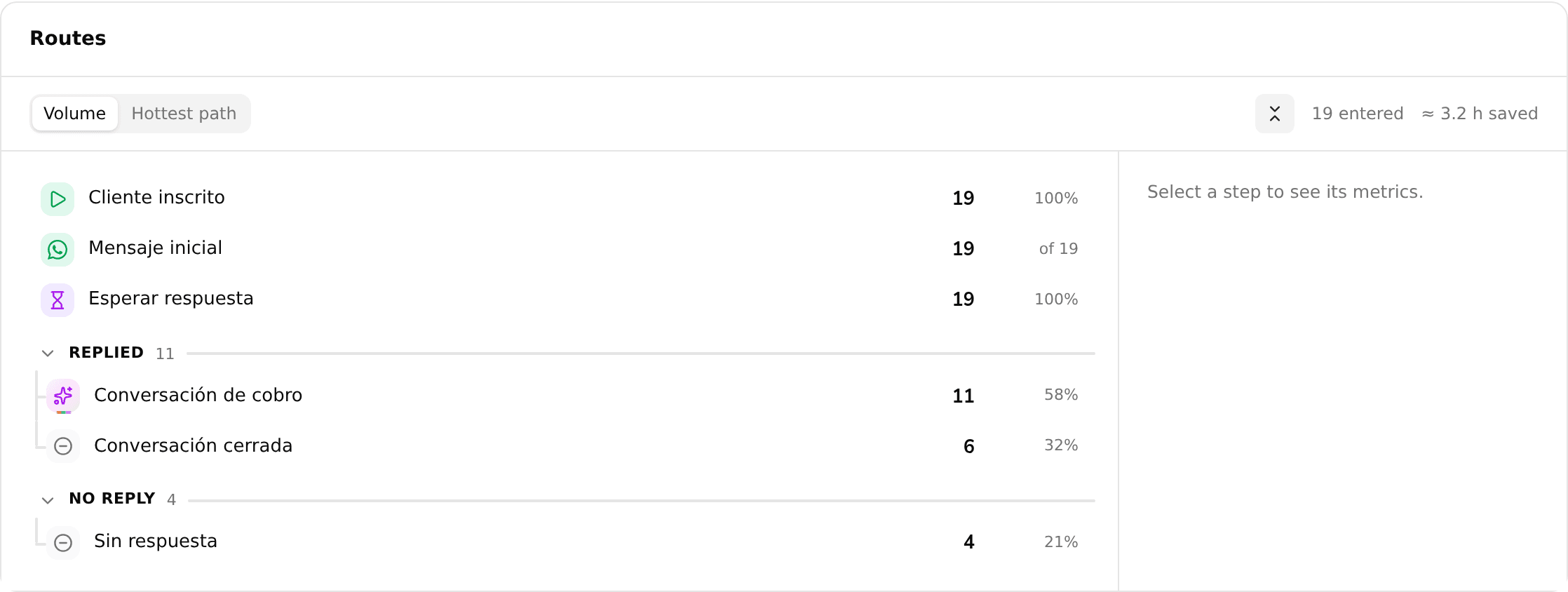
Routes is a new view inside Journey Analytics that reads a journey as an outline instead of a diagram: one row per step, with branches indented under the split that creates them, run counts on each branch, and an estimate of the operational time each step saved. It also counts how many AI messages were sent at each step, and shares the version and date filters you already have set on the dashboard.
Segments now support is between, a new date operator that matches a sliding window, like more than 90 and less than 97 days ago, instead of a fixed calendar range. Because the window moves forward every day, a segment built on it can enroll the same person again and again on a set cadence, for example re-surveying customers every 90 days instead of only once.
Build cart recovery journeys for your Shopify store. The products a shopper left in their cart and your checkout domain are now available as journey variables, so you can message customers about the exact items they abandoned and send them straight back to checkout.
A few smaller improvements from today.
Measure a journey with more than one success metric, each with its own name and aggregation (count, sum, average, or max). Attribution now starts from the first outbound message so replies across WhatsApp and email are counted correctly, a value metric can pull its amount from a linked record such as an order total, and you can filter results by journey version to compare performance before and after a change.
A few smaller improvements from today.
A few smaller improvements from today.
Run one journey against different environments. Set per-environment values with {{env.*}} (for example a different baseUrl for staging and production), and have an HTTP Request node authenticate with the secret that matches the journey's pinned environment. Test a journey against staging, then switch it to production, without duplicating the journey or editing each node.
A few smaller fixes from today.
<br> and where list bullets could be dropped from a reply.A couple of smaller fixes from today.
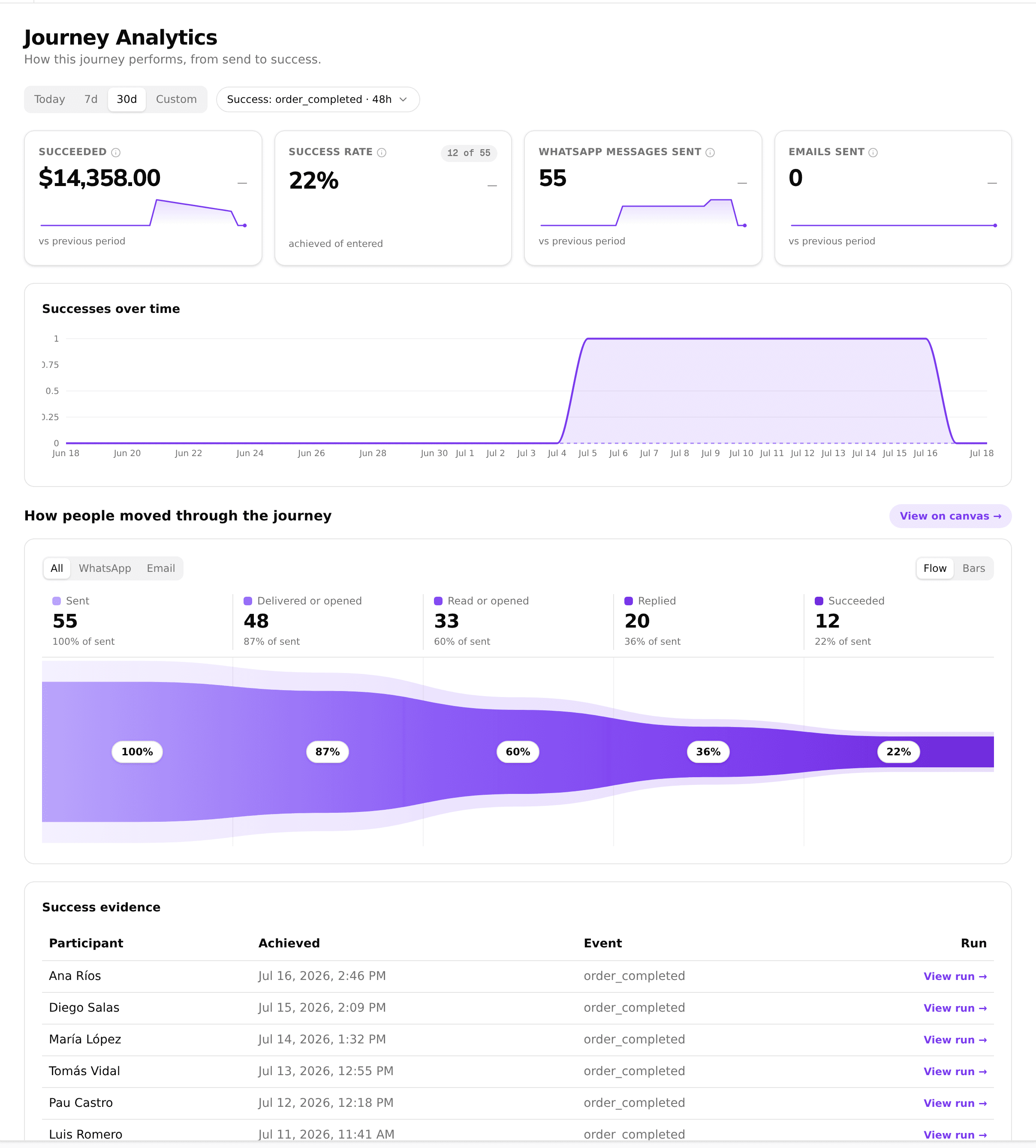
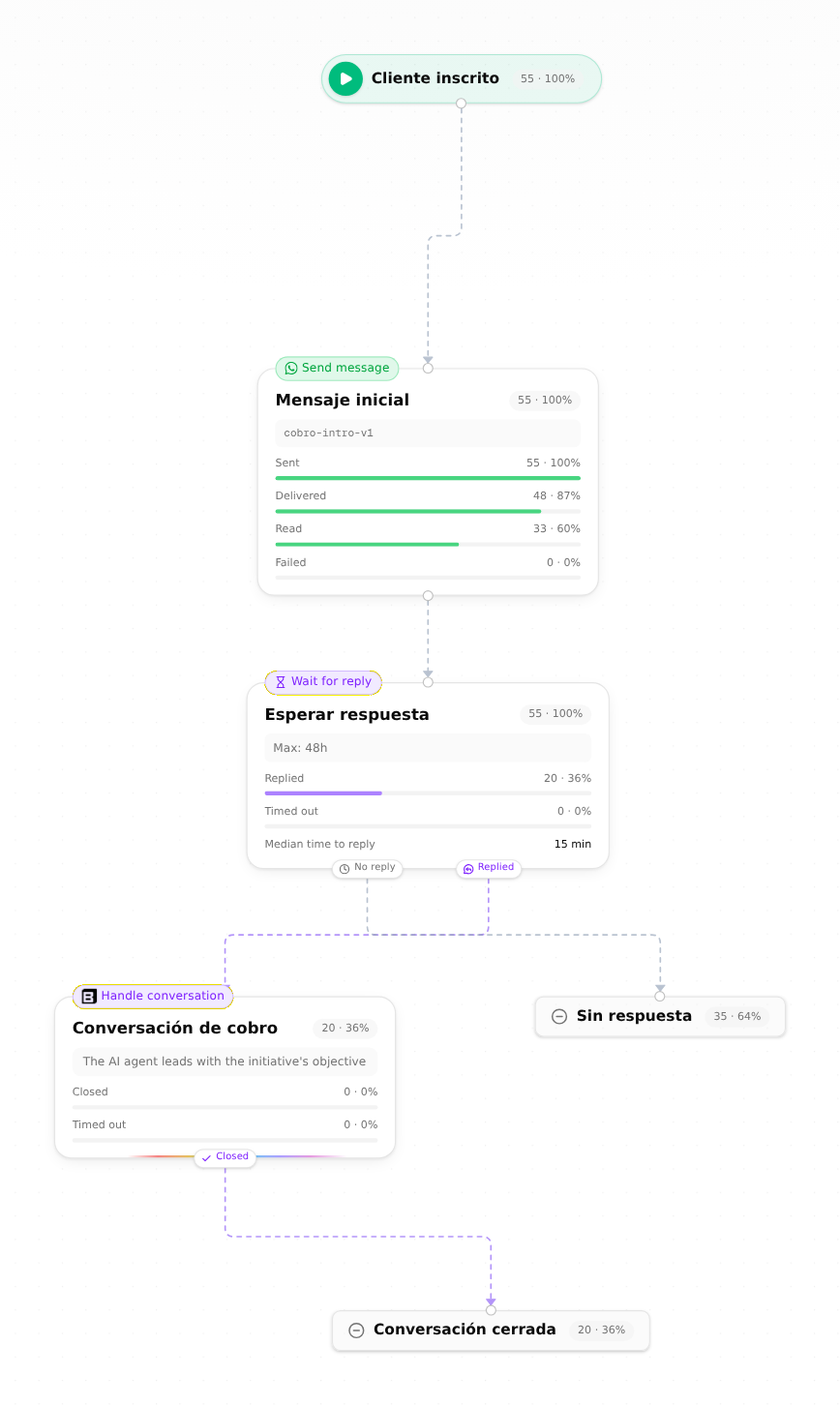
Every initiative now has a Journey Analytics dashboard that shows how a campaign is doing from end to end: a reach to reply funnel for each channel, KPI cards for messages sent and delivered, and a configurable success metric so you can define what counts as a win (a sale, a booking) and then see the success rate, the value generated, and the evidence behind each one. You can also open the journey map to read delivered, read, and reply counts on every node.
A few smaller improvements from today.
A few smaller improvements from today.
Journeys can now forward documents a customer sends over WhatsApp (IDs, payment receipts) to your own systems. The new engagement.documents variable resolves to secure, time-limited file links inside an HTTP Request node, so a journey can hand those files straight to your API. The agent also detects password-protected PDFs so they are handled cleanly.
The data your agent extracts from conversations can now be used as journey variables. Reference an extracted field inside a journey (in a condition, a message, or an HTTP request) and the value flows through automatically, so what a customer tells the agent can drive what happens next.
Operators can now add extra phone numbers and emails to a contact directly from the shared inbox, so a customer who writes in from a second number still resolves to the same person. Contact matching also got more reliable for numbers written with or without the extra Mexico country-code digit.
A few smaller improvements from today.
When a customer sends a PDF over WhatsApp, like a bank statement or a form, the Concierge now reads its text and can use it in the conversation and in your reports. If the file is password-protected, the agent recognizes that instead of treating it as unreadable, so it can ask for an unlocked copy.
The Sources page now covers every integration, your database, Shopify, and Skio, in one place, so you can view and edit your own sync queries without looping in a Boom engineer.
A few smaller improvements from the last few days.
The new email builder lets you design branded emails visually: drag in logos, headings, text, buttons, images, dividers, and footers, insert {{variables}} inline, and manage your own image library. Emails render with email-safe HTML so they look right in every inbox.
The extraction Data View got more analytical: numeric fields now show total, median, and range, you can export the data to CSV, and you can click a quote to open the exact conversation it came from. It is easier to trust and act on what the agent extracted.
Segments can now update reactively: when a person's data or events change, their segment membership updates right away instead of waiting for a scheduled sweep. Journeys triggered by a segment enroll people the moment they qualify.
Journeys now include a Send Email node, so an automated flow can reach someone by email the same way it does over WhatsApp. Point the node at a published email template and it sends with each recipient's real data.
A few smaller improvements from the last few days.
From the contacts table you can now download your contacts as CSV or Excel, either the rows you have selected or every contact matching the current view and search. The export always includes every extraction field, even columns hidden by the column picker, so you get the complete data no matter how the table is arranged.
You can now author a complete journey without touching the builder canvas. The new write surface lets you create, edit, validate, and publish an entire journey (every node type and every connection) from the public API, MCP, and the in-app Sidekick. Build a flow by describing it in chat, fork a live journey into a draft, or manage your journeys straight from your own tools.
A few smaller improvements from today.
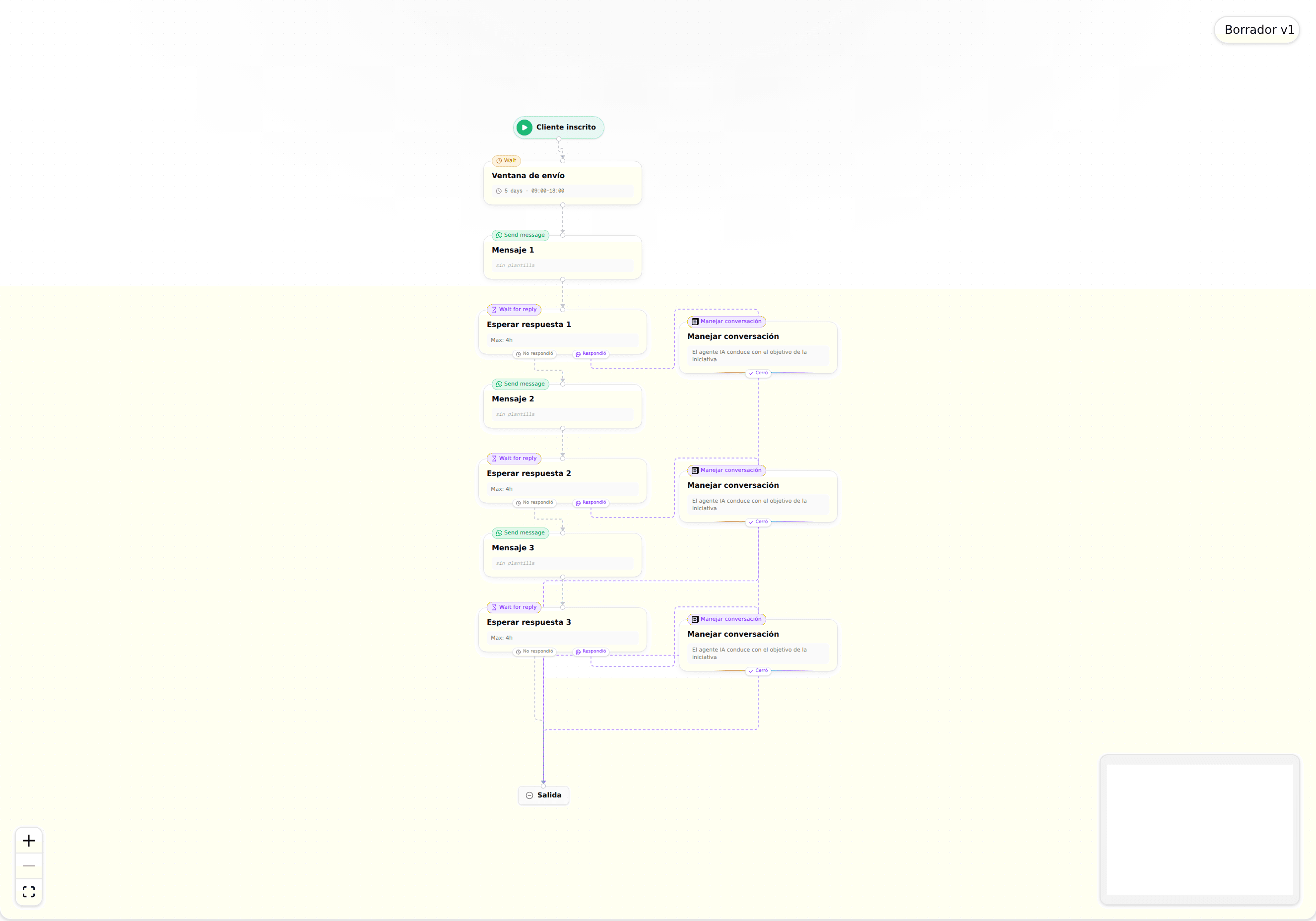
The journey builder got a visual refresh: a cleaner canvas with clearer node cards and more helpful editing affordances. Building an automated flow (enrollment, send windows, messages, wait for reply branches, and AI managed conversation steps) is now easier to read and lay out.
You can now do more than read from the public REST API and MCP server. Launch research Initiatives, create and manage Segments, and add, list, and stop Participants, including pulling a participant's full conversation transcript. Journeys are now readable through the API too. Every action runs on the same definition behind the API, the MCP tools, and the product, so your own systems and agents stay consistent with what you see in the app.
A few smaller improvements from this week:
The visual journey builder now splits waiting and talking into two dedicated blocks. Wait for reply pauses a journey until the customer responds, and Handle conversation is a first-class card your AI agent uses to hold a back and forth toward a goal. You can expand and edit a block in place and drag it to reorder, so building a multi-step flow is clearer and faster.
Creating an initiative is now a guided four-step wizard: set it up, configure the agent, choose what data to extract, and shape the journey. Each step keeps the choices in front of you, so you can launch a research or outreach initiative with confidence and step back to adjust anything before you go live.
A few smaller improvements from the last couple of days.
The journey builder now uses clearer building blocks so it is easier to see what each step does. The old Conversation step becomes Wait for reply, a new Handle conversation block lets you choose whether AI or a human takes over, and the confusing send-immediately toggle is replaced by an explicit send-window step. Building an outbound journey now reads the way it runs.
The Metrics dashboard has a refreshed layout with a new funnel overview, softer sentiment colors, and clearer labels, so your results are easier to read at a glance. Response rate and the conversation funnel now count real inbound replies, so the numbers reflect what actually happened.
The metrics view got a rework that makes results easier to read at a glance. A new funnel shows how contacts move through each stage, the response rate and funnel are now based on real inbound messages, and the layout, colors, and labels are cleaner so you can spot what is working faster.
A few smaller improvements from today.
You can now maintain a Do Not Contact list per organization from the new dashboard under People, so opted-out contacts are never messaged again by mistake. A contact is added automatically when they reply STOP, use the one-click unsubscribe link in an email, or is added manually, and every outreach campaign, journey message, and automated follow-up checks the list before sending. A team member can still send a message by hand when it is truly needed, with a clear warning and a permanent audit log, and the dashboard now supports search and pagination to keep long lists easy to manage.
A few smaller improvements from today.
A few smaller improvements from today.
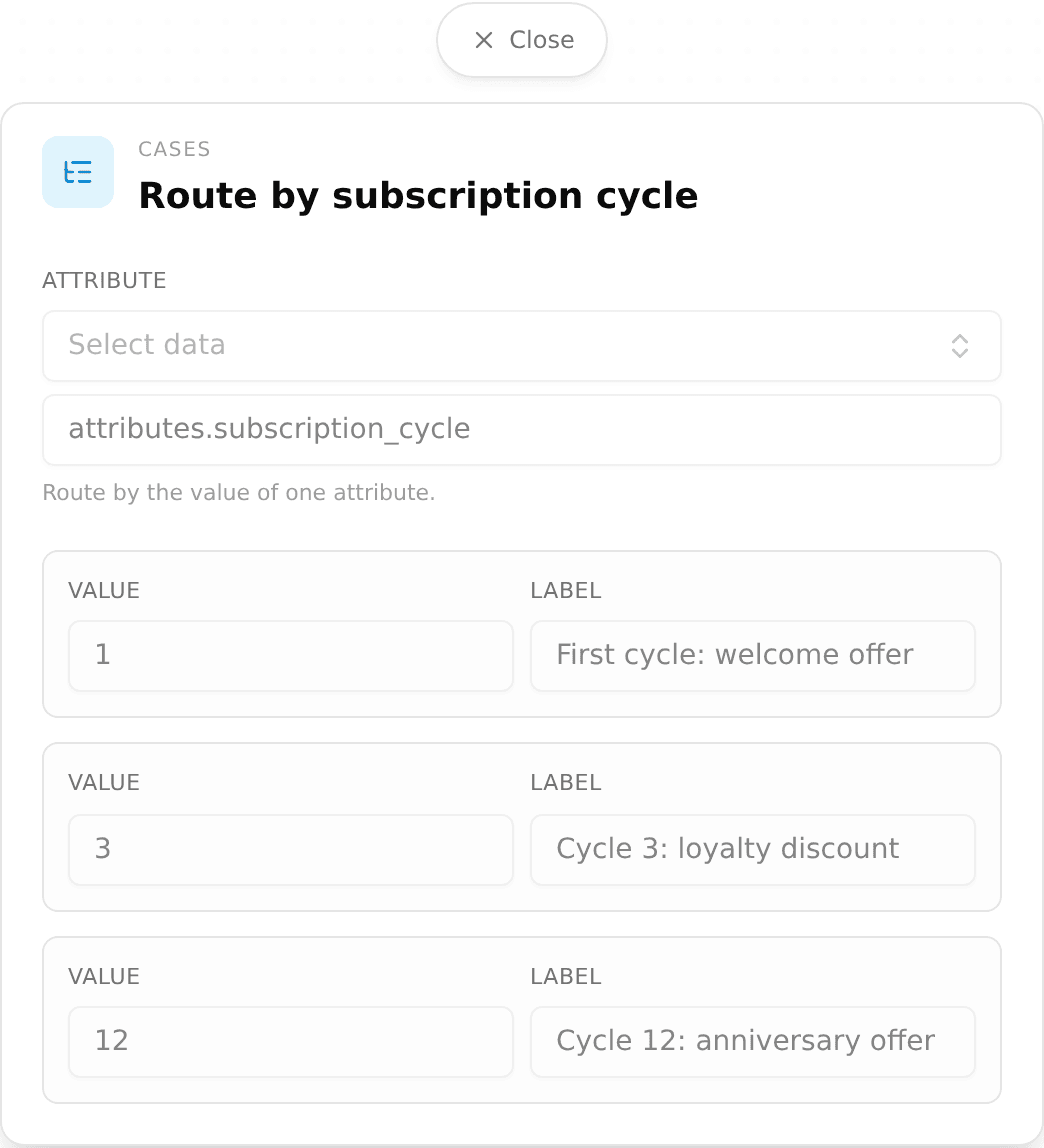
You can now add a Case node in the journey builder to route people down many paths based on a single attribute value, instead of chaining several decision steps. Each branch has its own outcome and there is a required default, so everyone lands somewhere and no one silently falls through.
You can now configure your agent per channel from a new settings screen: pick a default agent, toggle AI on or off, and set the namespace for each channel independently, with a fallback to your organization defaults. WhatsApp and web chat can behave differently without extra setup.
The public REST API and MCP server can now create and manage your research Initiatives, not just read them: create a draft, update it, cancel or archive it, and link a WhatsApp outreach template to an initiative. You can also create, list, and check the approval status of WhatsApp templates, so you can run campaigns end to end from your own systems.
The in-app assistant can now draft a complete email template from a simple chat prompt, filling in the copy and the right customer variables for you. Describe the email you want and start from a working draft instead of a blank canvas.
A few smaller improvements from today.
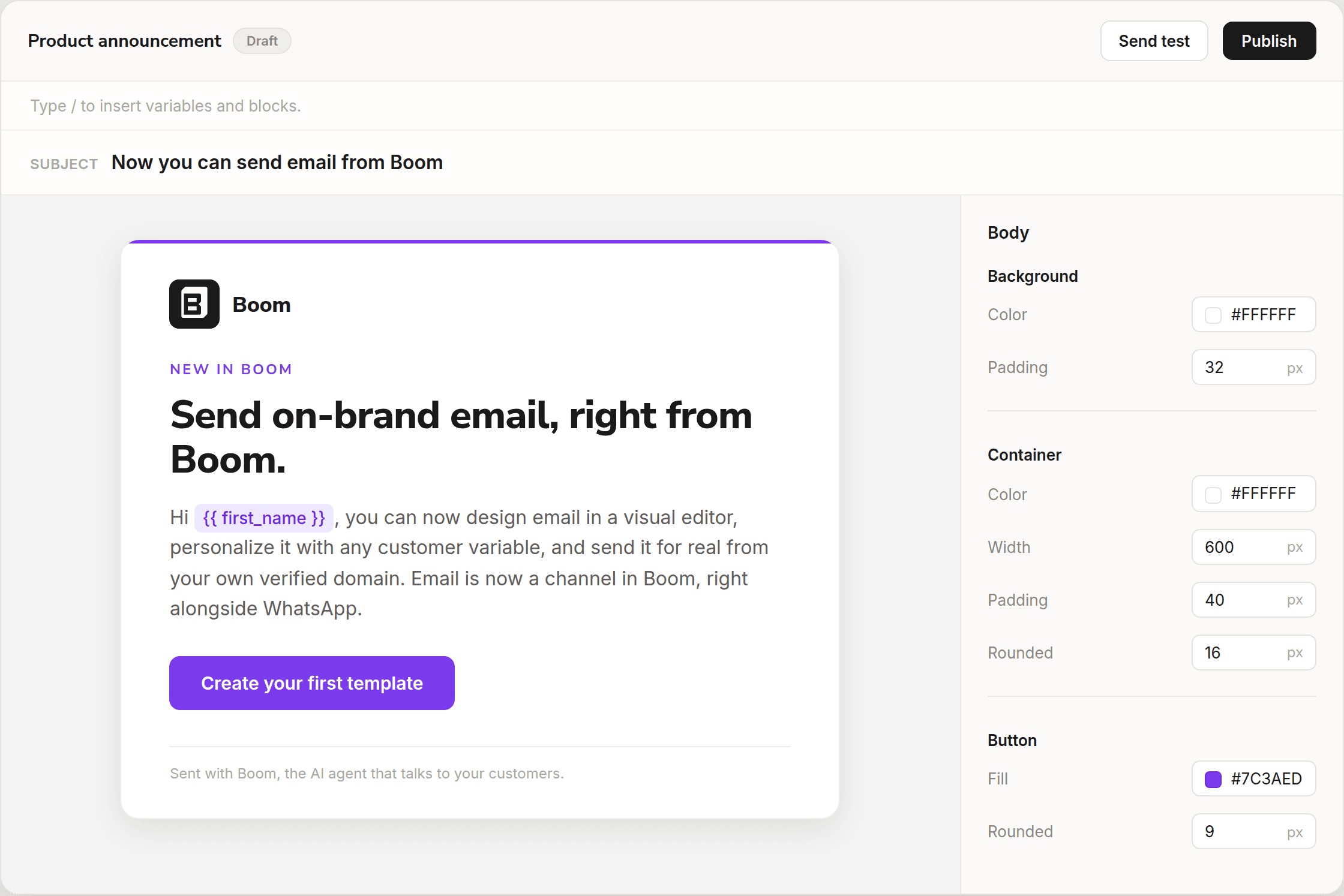
You can now author on-brand email templates in a rich editor: write your copy, drop in customer variables from a slash menu, and start from a gallery of ready-made templates (welcome, onboarding, reactivation, and more). Send a test to yourself, then send for real from your own verified domain, so email becomes a fully operated channel alongside WhatsApp.
In the visual Journey Builder, WhatsApp message steps can now pull fields from your custom events as variables. When a journey is triggered by an event, pick its properties (like plan_tier or order_total) from a dropdown and drop them straight into your message, so each send is personalized with the data that started the flow.
The public REST API and MCP server now read your research Initiatives and the data they collect: list and get initiatives, participants, and their extracted variables, plus a per-initiative summary of engagement and results. Personal and internal fields stay hidden, so your own systems and agents can pull insights safely.
A few smaller improvements from this week.
@ mention, and they render as inline chips so it's clear which files the agent is using.A few smaller improvements from this week.
You can now enroll people into a journey by picking them manually from your CDP or by taking a snapshot of an entire segment, with no CSV upload required. Each source can be added as pending or start the journey right away.
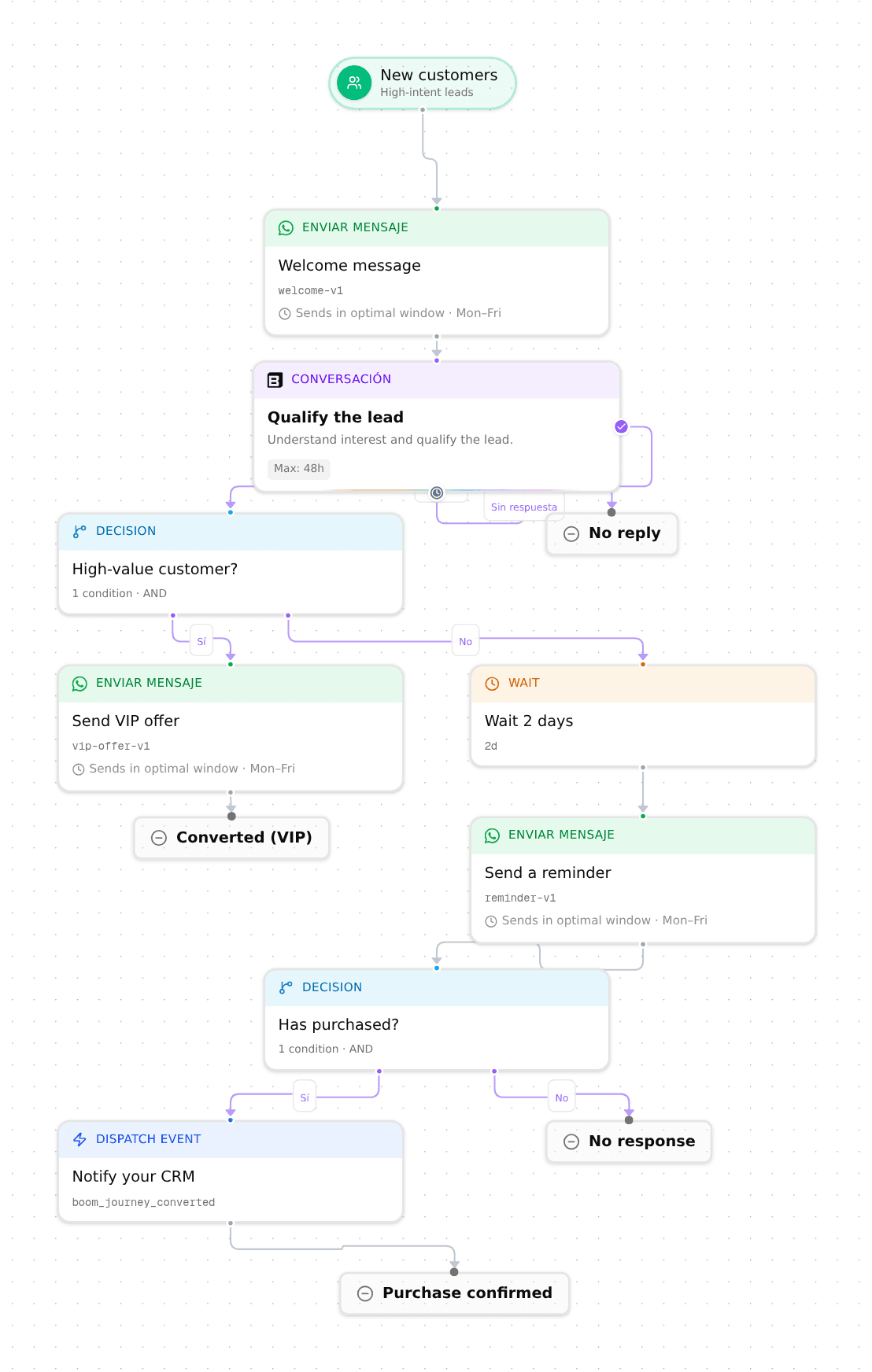
Journeys are now available to every organization, no longer behind a preview flag. Build automated, multi-step flows over WhatsApp in the visual builder: branch on customer data with decision nodes, wait, send messages, run a conversation, and dispatch events, with each path ending in its own outcome. Access is role-based: admins have full control, and other roles get read-only access.
Message templates that attach a PDF now show the first page of the document in the WhatsApp media preview, instead of a generic file icon. You can confirm you attached the right document before sending.
A new public REST API lets you create and preview segments and read your CDP catalog (relationships, custom object types, and relationship types) from your own systems. The same data is available through an MCP server, so your own agents can query Boom directly.
A handful of smaller improvements across segments, journeys, and templates:
When you create an initiative, Boom now builds the first draft of its journey and outreach messages automatically in the background, including a message for each follow-up round, reusing your approved templates when they fit. Starting a new campaign goes from a blank canvas to a ready-to-review draft.
You can now set how far the agent digs in on each guiding question, from no follow-up to a deep, multi-turn probe. Use lighter follow-ups for quick survey-style questions and deeper ones where you want richer, more detailed answers. This gives you finer control over the length and depth of every interview.
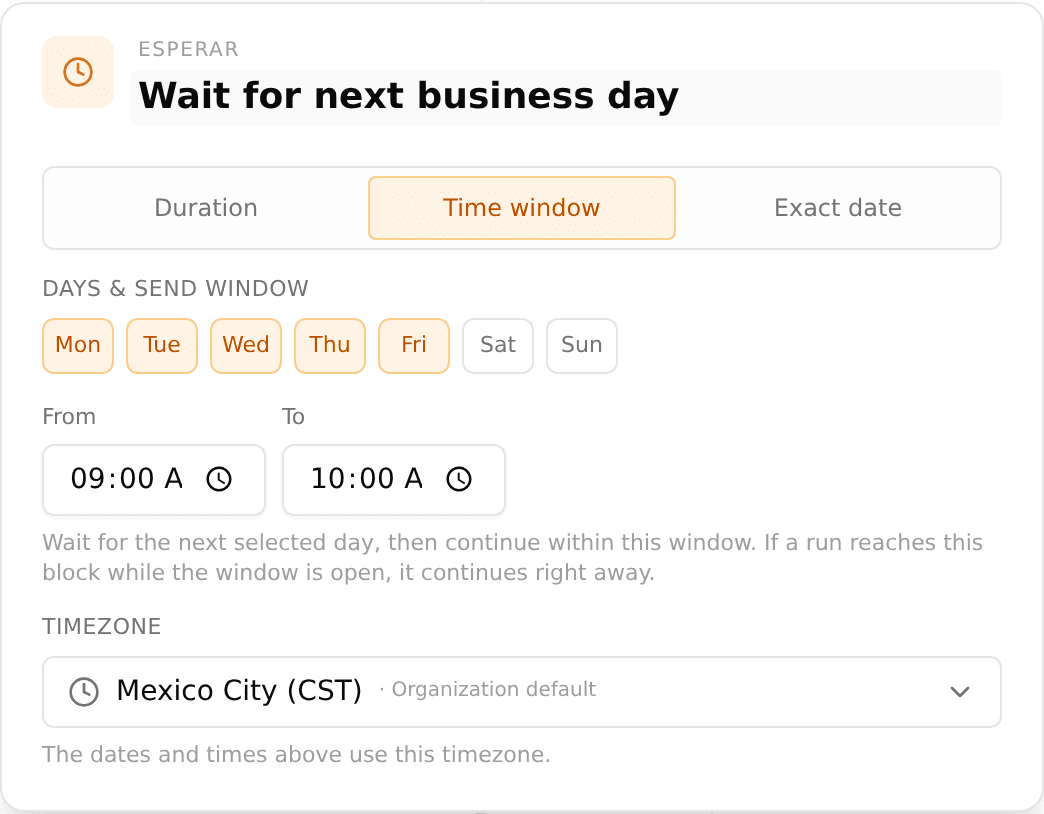
The Wait step in journeys can now hold a contact until a specific date and time, or until the next weekday you choose (for example, the next Monday at 9 AM) in your organization timezone. Before, a wait could only pause for a relative amount of time. Now you can align messages with launches, deadlines, or business hours.
A few smaller upgrades:
You can now build a segment from a library of common templates (for Shopify, Skio, and connected databases) instead of starting from a blank filter. Pick a template, adjust it, and your audience is ready. Segments are also now reachable over the public API.
Creating an initiative is now just an objective and a bit of context, and you are done. The long multi-field setup form is gone, so you can launch a research or outreach initiative in a fraction of the time.
A handful of smaller fixes across the inbox and engagement views:
The Shared Inbox is now on for every team on your plan, with no setup required. Anyone with inbox access can see and reply to conversations across WhatsApp and your other channels from one place.
WhatsApp template buttons can now carry personalized link variables, so each recipient gets their own URL (a unique reward link, a tailored checkout) resolved at send time. Template header images are also saved now, so they appear in the shared inbox instead of showing as text only.
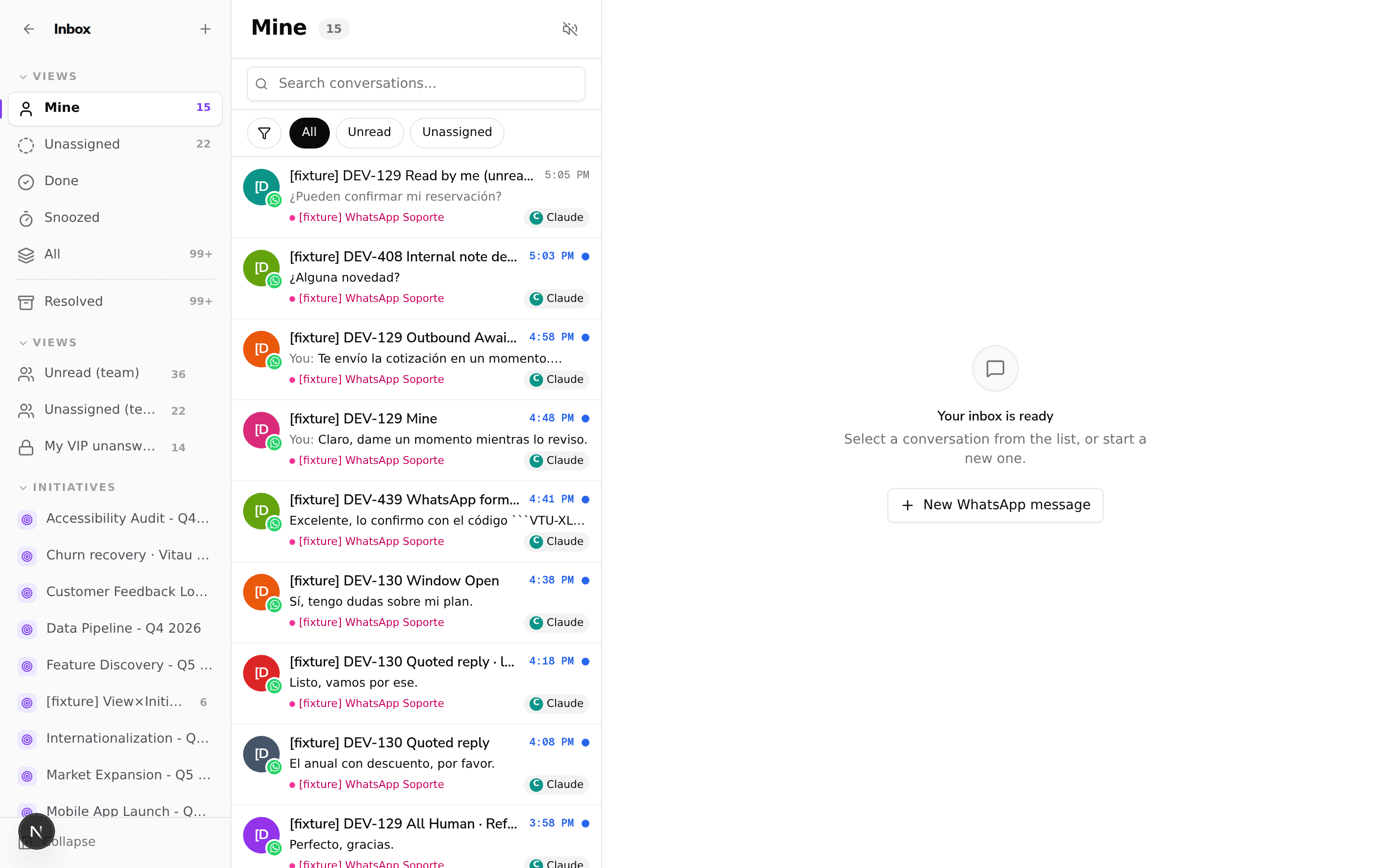
The inbox got a round of polish: resolved conversations now look visually distinct, the All view shows only open conversations with a count badge, actions update the list instantly, and the context panel surfaces a contact's channel and identity even when there is no match in your data yet.
Journey messages can now pull in variables from your data and from the events that triggered them, so each customer gets a message written for their context. Picking the event that starts a journey is clearer too, with a branded event picker.
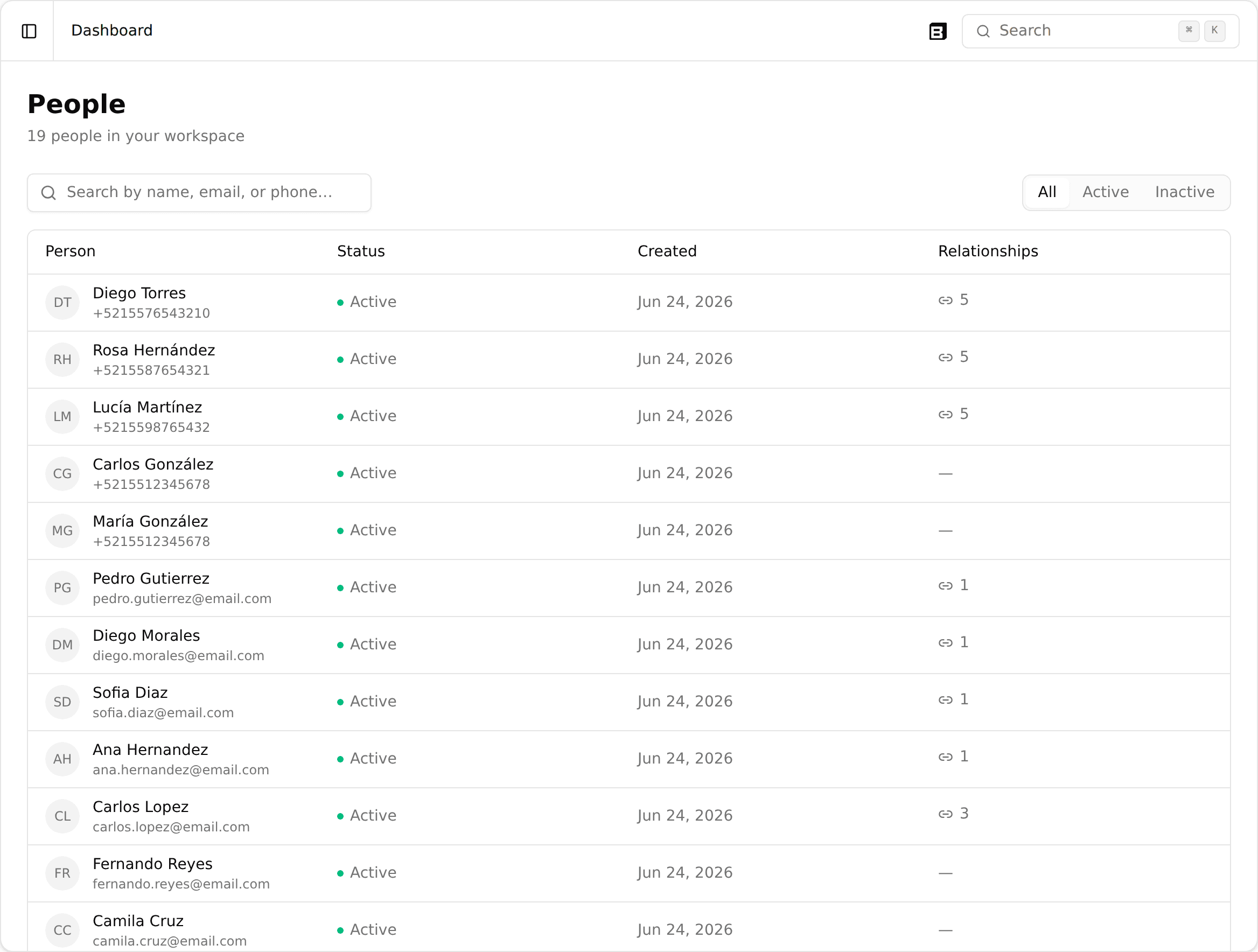
A new People directory lets you browse everyone in your customer base in one paginated table, then open any profile to see their attributes, events, and conversations across tabs. Find the right person and understand them at a glance.
Segments can now use computed attributes like number of orders or total spent, calculated for you from each person's history, plus match on list and tag values. Build audiences around behavior, not just static fields.
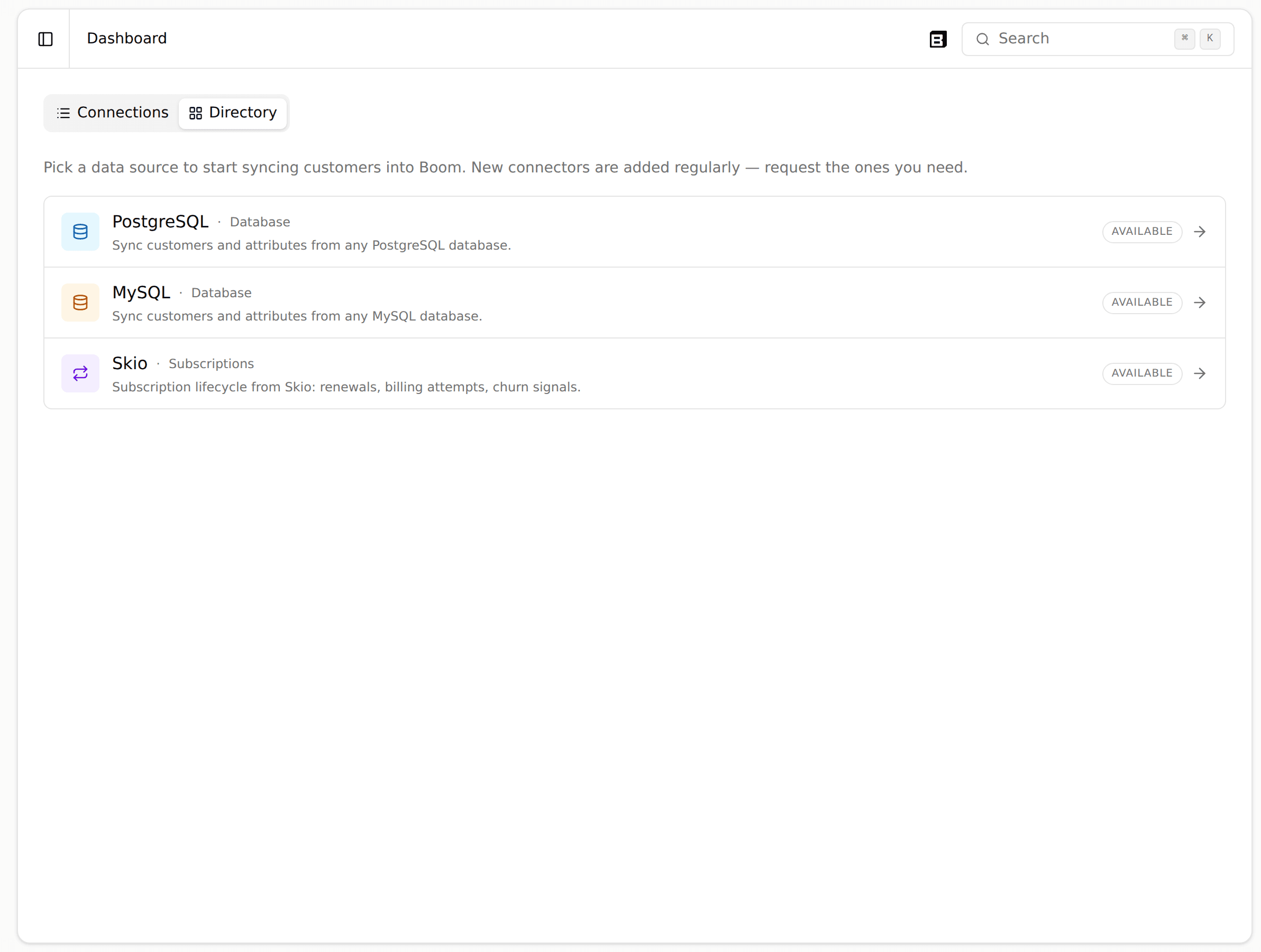
You can now connect your Skio subscriptions to Boom from the Integrations page, using a self-serve API key. Bring your subscription data in so your segments and journeys can act on it.
Journeys got three new controls: a frequency cap so a customer never gets too many messages, a node that fires an event into the CDP as the journey runs, and the ability to remove a customer from a journey the moment a chosen event happens.
Boom now supports more than one WhatsApp business account at once. Choose which number sends each step of a journey, and templates stay scoped to the account they belong to across journeys and the inbox, so the right sender and the right templates always line up.
Segments can now filter across related records and reach into nested attributes. Build a segment that follows the link from a customer to their orders, or matches on a value buried inside a JSON field, all from the same builder.
Describe the audience you want in plain language and the agent builds the segment for you, turning your request into the right conditions, including links to related records and nested fields. No manual filter setup required.

A new analytics dashboard shows how your conversations are going, with volume over time, response times, an hourly activity heatmap, and an operator leaderboard. Filter by the dimensions that matter and see where to focus.
Boom is now available end-to-end in Portuguese (pt-BR), both the operator dashboard and the agent itself. Set Portuguese as your workspace's default language and run conversations natively in Brazil.
The shared inbox got a rework. Every conversation row now shows which channel and number it came from, a new filter bar lets you slice by channel, and search was rebuilt to scan across all sessions of a conversation, returning results in milliseconds instead of seconds.
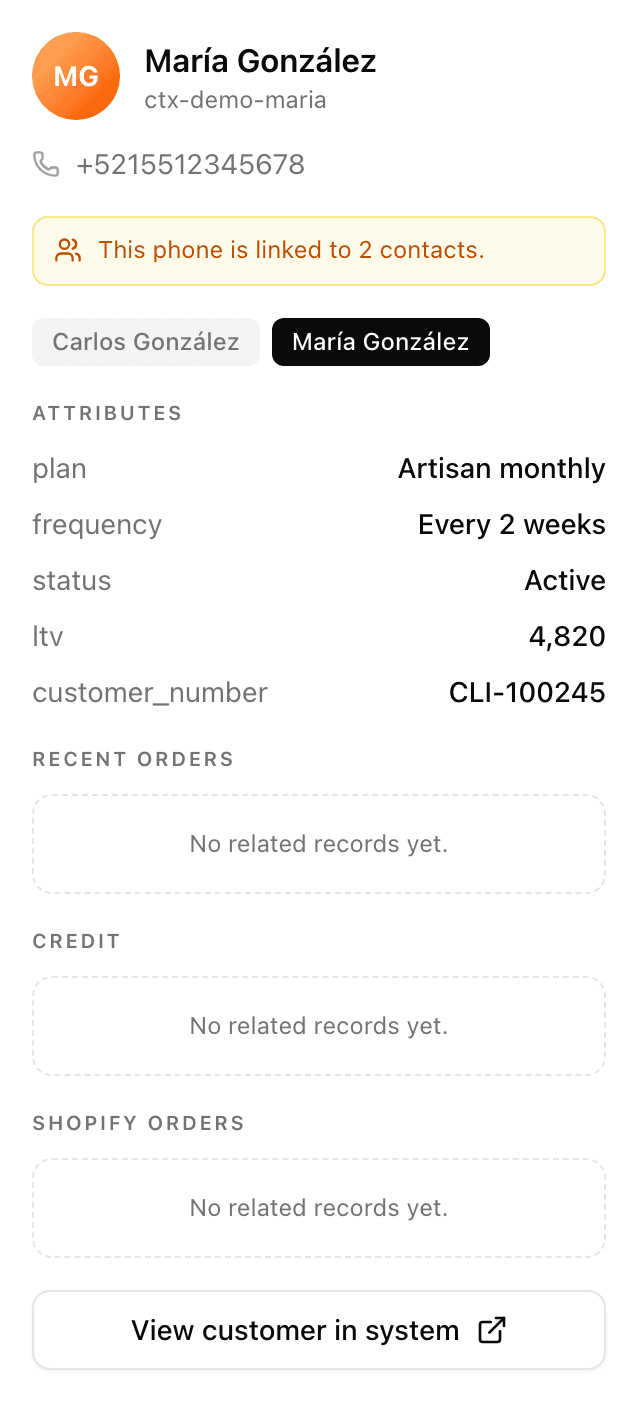
You can now configure exactly what your operators see next to each conversation: customer attributes, related records like orders or loans, and deep links into your own systems. Set it up once and every agent gets the context they need to resolve faster.
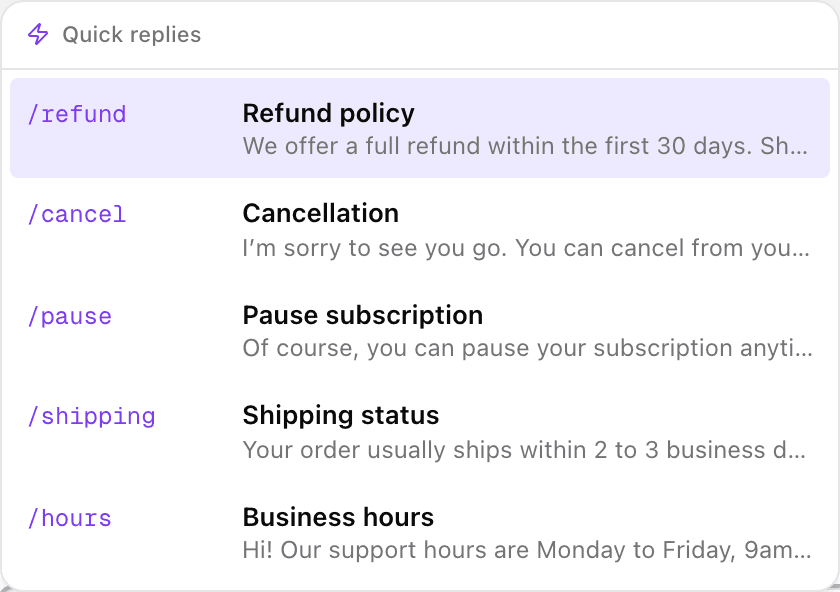
Save your team's most common responses and drop them into any conversation with a / shortcut or a button. Edit before sending, and search across all of them. Quick replies are separate from WhatsApp templates, so they're yours to manage.
The new segments builder lets you combine conditions with AND/OR in a simple three-step flow. Schedule a segment to refresh daily at the hour you choose, and export the full membership to CSV.

Boom can now read your customer data straight from your own database, with no CSVs and no middle layer. Model real-world relationships like one buyer across many merchants, push behavioral events such as a completed payment, and segment on what your customers actually do. A documented public API keeps everything in sync with your systems.
A journey can now enroll a customer the instant something happens, like a completed order or a churn-risk signal, straight from a CDP event. There's no CSV and no waiting for the next segment refresh. The right message goes out in the moment.
You can now chat with your agent right inside the initiative. It's a live test that runs the real pipeline and streams responses as they generate, so you can try multi-turn flows and edge cases before any customer sees them.
Connect your Shopify store in a few clicks and Boom keeps customers, orders, and your full product catalog continuously in sync. The agent can reference real products in the conversation, with their images and descriptions.
Leave internal notes in a conversation thread to pass context to a teammate, drop a reminder, or note a handoff detail. Notes stay private to your team and never reach the customer.
Upload your documents, like product sheets, policies, and FAQs, and the agent searches them to answer customer questions. It pulls the right passage from the right file, so replies stay grounded in your own content.
Boom now runs on WhatsApp, Instagram, Facebook, web chat, and email (beta), with support for multiple WhatsApp numbers per workspace. Every channel lands in one shared inbox, and the agent answers with the same customer context no matter where the conversation starts.
Beyond downloading a single conversation, you can now export the transcripts of many conversations at once, as a single consolidated .txt you can hand off or analyze in bulk.
Your agent can now send images, PDFs, and video in WhatsApp conversations, not only text. It shares receipts, product sheets, or onboarding docs right inside the chat, picking the right file for the moment.
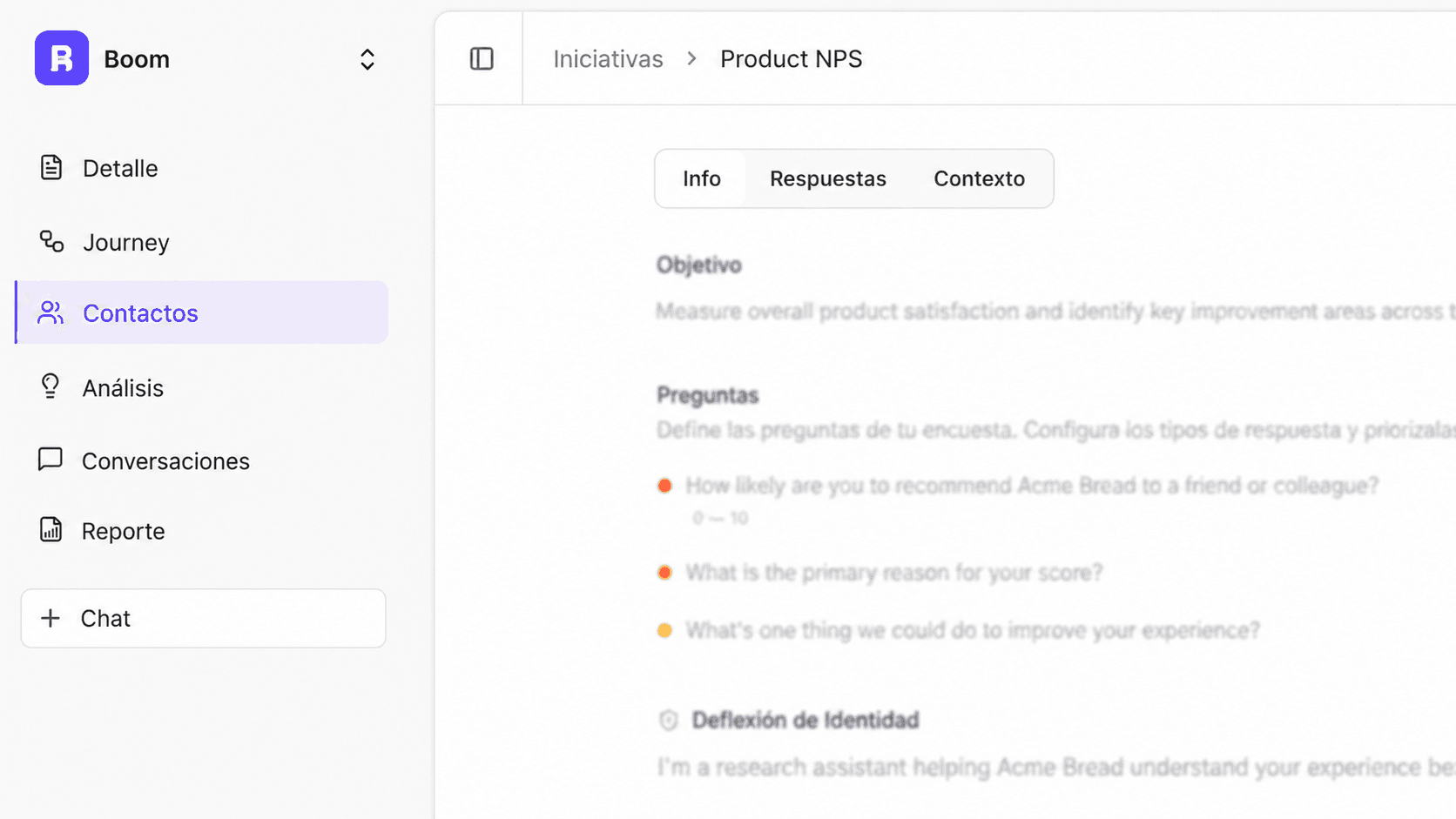
Contacts is now a dedicated section in the initiative sidebar, easier to reach, with a unified view of engagement status, filters, and bulk actions to start journeys.
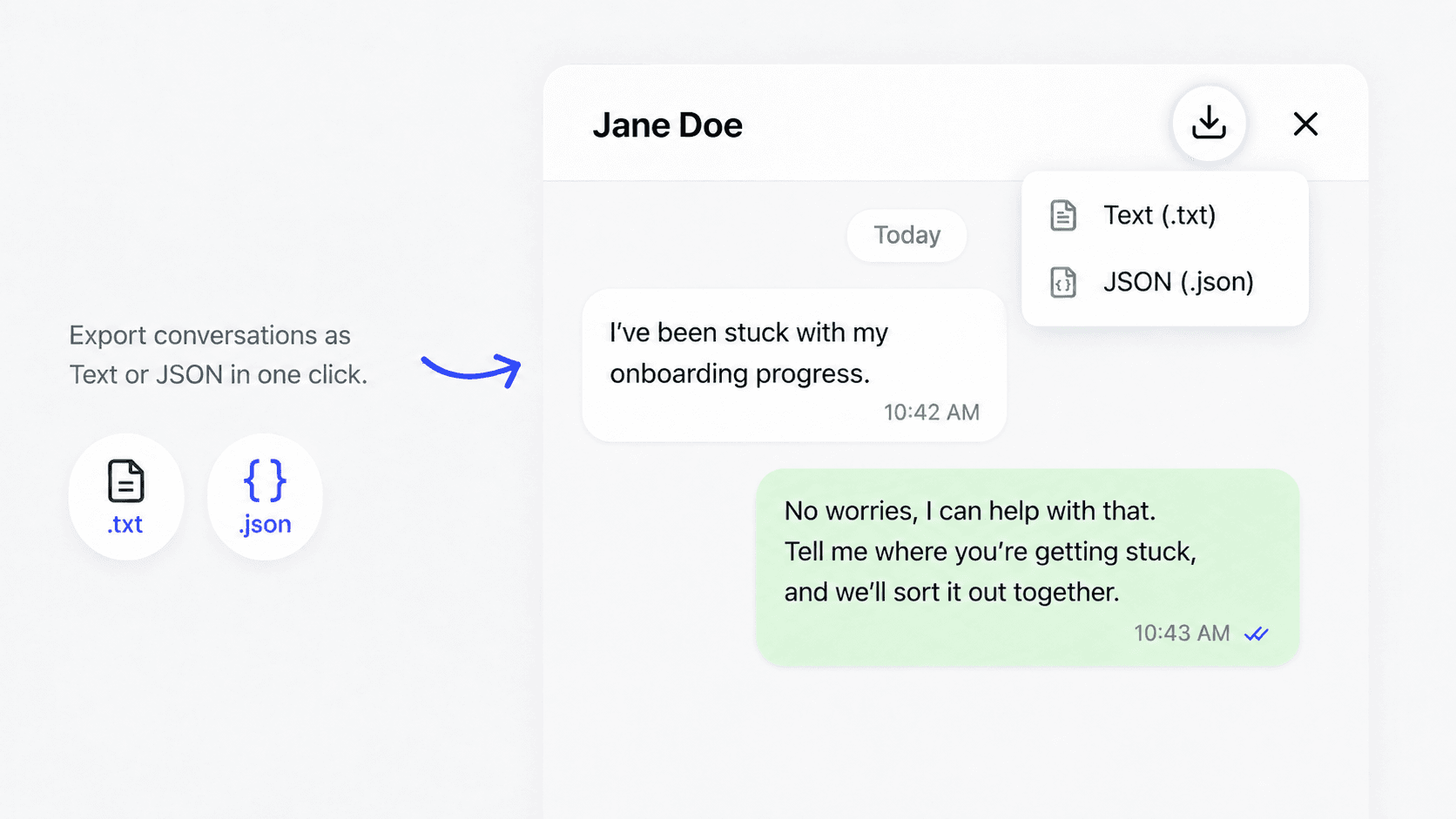
You can now download the full transcript of any conversation, as plain text (.txt) for quick sharing, or as JSON (.json) to feed into your own analysis.
We deployed a new version of Boom Voice. It sounds dramatically more natural, perfect for Research campaigns running over voice.
You can now run Boom Surveys: shorter, focused conversations to ask your customers a specific question and get fast answers.
Use Surveys when a full Research interview is more than the moment calls for: a quick pulse after a release, a single follow-up question, or a targeted check-in with a segment.
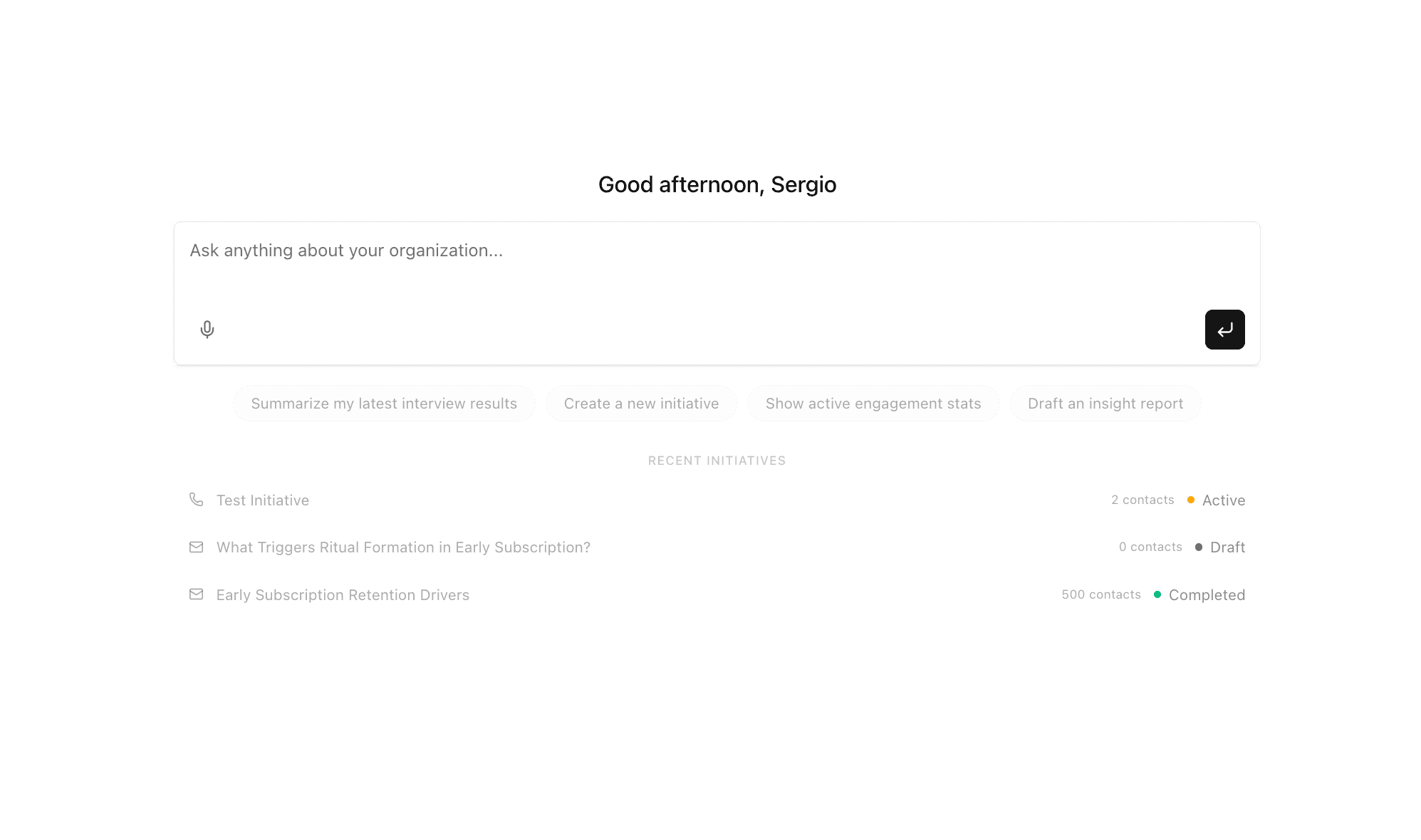
We built an agent at Boom that controls the entire platform.
It can create research initiatives. Change settings. Add context about your company. All through a conversation.
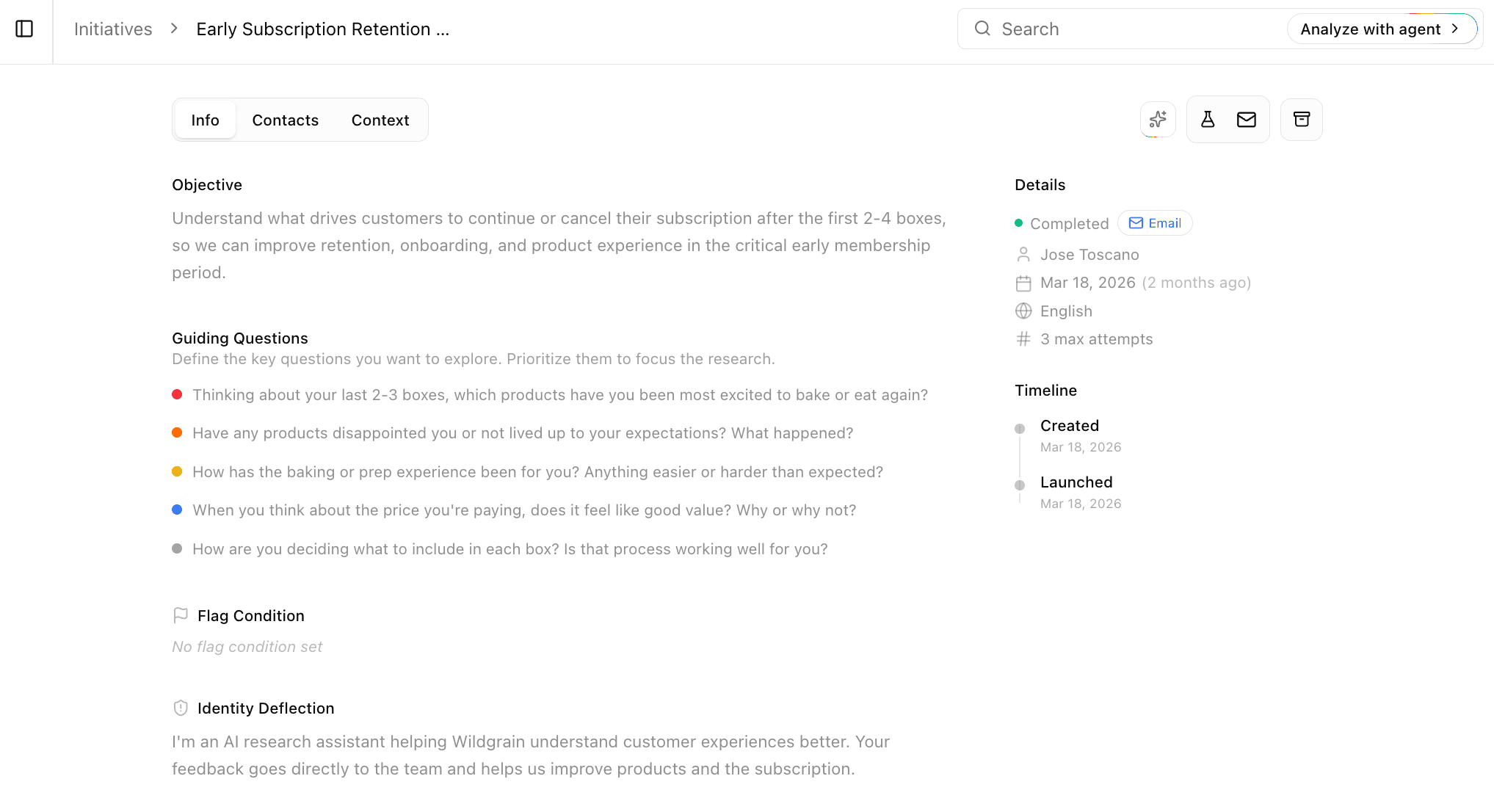
Define your research objective. Add the guiding questions you want answered. Boom does the rest.
Boom Research runs personalized, context-aware customer interviews at scale over WhatsApp, email, and voice, turning what used to take weeks of recruiting and scheduling into a 2-day workflow. Each conversation feels human, follows the thread your customer opens up, and stays focused on the questions that matter to you.
When the conversations are done, Boom synthesizes every transcript into an actionable insight report, so you go from "let's talk to users" to "here's what we learned" in days, not quarters.